

Table of Contents
- What Is Automated License Management for Forex Developers?
- Forex EA Protection Methods and DRM Implementation
- MQL5 License Management System: Implementation and Best Practices
- How to Prevent EA Piracy: Practical Defense Strategies
- MQL4 License Verification Script: Building Secure Validation
- Compliance, Regulatory Requirements, and Risk Management
- Top Automated License Management Tools for Forex Developers
- Implementation Roadmap: Setting Up Automated License Management
Automated License Management for Forex Developers: A Technical Guide
Last Updated: July 11, 2026
Protecting your Expert Advisors from unauthorized distribution is essential in the forex development space. Automated license management for forex developers has become critical infrastructure for anyone selling trading software. Teams that implement strong license protection systems retain 40-60% more paying customers than those relying on honor systems or manual activation.
The challenge is building a system that feels frictionless to legitimate users while making piracy economically pointless. Below, we’ll show you exactly how to architect automated license management for forex developers, from DRM implementation to trial-to-paid conversion workflows.
What Is Automated License Management for Forex Developers?
Automated license management for forex developers is technical infrastructure that controls how, when, and where your Expert Advisors execute. It combines license key generation, device binding, activation verification, and real-time enforcement without requiring manual intervention.
At its core, this system answers three questions: Is the license valid? Does it match this device? Has it expired? The answers determine whether the EA runs or shuts down.
The best license systems fail silently. A legitimate user should never see an error message. An unlicensed user sees nothing, the EA simply doesn’t load. This asymmetry separates professional protection from amateur attempts.
Why Forex EAs Need Protection
Forex EAs are high-value targets. A single profitable trading algorithm can generate thousands of dollars monthly. Unlike SaaS products where users access your servers, EAs run locally on user machines. Once installed, a determined pirate can reverse-engineer, modify, or redistribute your code. One leaked EA version can eliminate your entire customer base.
Automated license management shifts the economics. Piracy becomes a game where you hold the advantage. Every cracked version that tries to run gets detected. Every legitimate user gets seamless access. This creates a sustainable business model where customers choose to pay because the licensed version works better.
Core Components of License Automation
A production-grade system requires five interconnected pieces:
- License key generation engine: Creates unique, cryptographically signed keys tied to customer identity and purchase terms
- Hardware ID binding: Locks each license to specific device characteristics (CPU ID, motherboard serial, MAC address)
- Activation server: Validates keys and issues time-limited tokens that the EA checks locally
- Enforcement logic: Code embedded in your EA that verifies licenses before executing trades
- Revocation mechanism: Ability to disable compromised or fraudulent licenses in real-time
Forex EA Protection Methods and DRM Implementation
Digital Rights Management for Expert Advisors operates differently than traditional software DRM. Your EA runs on the trader’s machine, not your servers. Your protection must be local-first, with optional cloud validation.
Digital Rights Management for Expert Advisors
DRM for forex EAs uses a hybrid approach: offline validation for speed, online validation for security. The EA checks its license locally using cached tokens. Every few days, it phones home to verify the license is still active.
This design solves a critical problem. Traders operate in different network conditions. A system requiring constant internet connectivity fails when traders travel or operate in areas with unstable connections. Offline-first DRM lets them trade uninterrupted while still preventing long-term piracy.
The enforcement happens in your MQL5 code. Before your EA enters the main trading logic, it calls a license verification function that checks: Does a valid license file exist? Is the hardware ID in the license file the same as this machine’s hardware ID? Has the license expired? Does the license signature match our private key? If any check fails, the function returns false and your EA stops.
Never store your private key in your EA code. Crackers will extract it and generate fake licenses. Store the private key on your activation server only. Your EA contains only the public key, which can verify signatures but not create them.
Hardware ID Binding and Device Locking
Hardware ID binding separates professional license systems from amateur ones. Without it, a customer can share their license key with 100 friends. With it, the license works on exactly one machine.
A hardware ID is a fingerprint of the machine’s physical components. The best approach combines multiple identifiers: hash CPU ID + motherboard serial + first disk’s serial number. This fingerprint survives minor hardware changes while preventing license transfers to different machines.
When a user activates their license, your activation server receives their hardware ID, generates a license file containing it, signs the file cryptographically, and returns it. The user’s EA always carries this license file. Before trading, it verifies the stored hardware ID matches the current machine. If someone copies the license file to another machine, the hardware IDs won’t match, and the EA refuses to run.
MQL5 License Management System: Implementation and Best Practices
MQL5 is the native language for MT5 Expert Advisors. Your license verification code lives inside your MQL5 implementation.
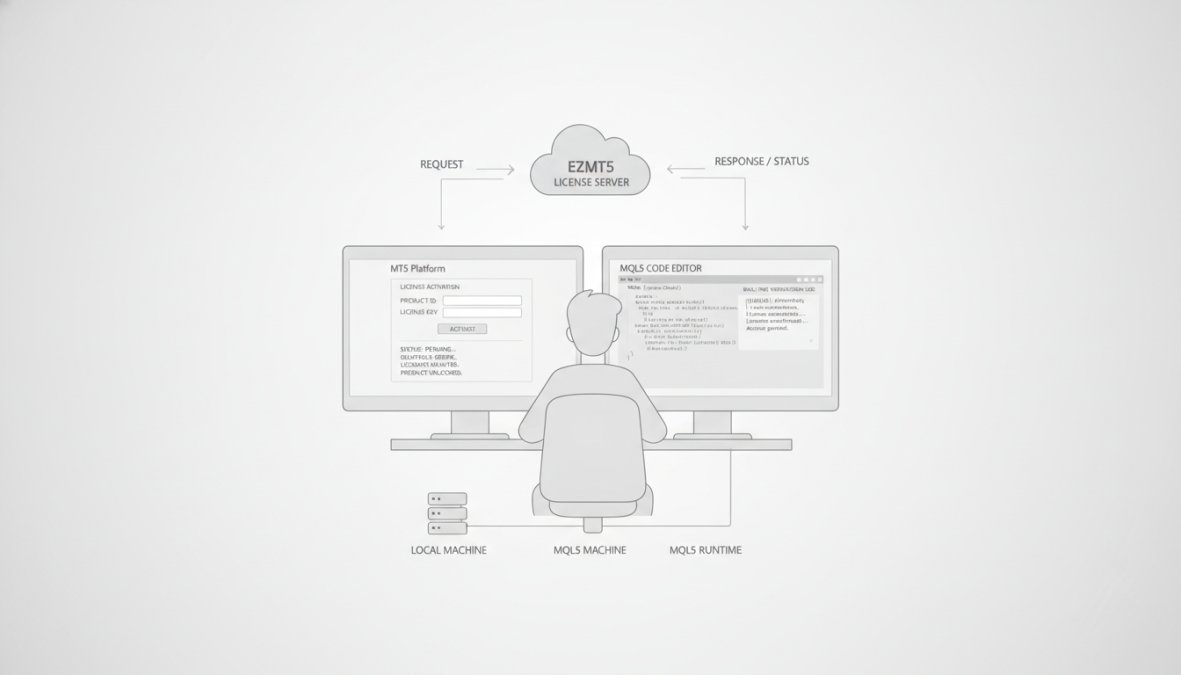
License Key Generation and Activation
Your license key generation system must be cryptographically sound. A strong key generation process works like this:
- Customer purchases EA: Your payment processor notifies your activation server
- Server generates unique key: Uses a cryptographically secure random number generator to create a 32-character alphanumeric string
- Server signs the key: Uses HMAC-SHA256 or RSA to create a signature proving the key came from your server
- Server stores the key: Records it in your database linked to customer email and purchase date
- Customer receives key: Via email with activation instructions
- Customer activates in MT5: Pastes the key into your EA’s activation dialog
- EA calls activation server: Sends key + hardware ID to your server
- Server validates and issues token: If the key is valid and unused, server returns a time-limited activation token (valid for 90 days)
- EA stores token locally: Saves it encrypted on disk
- EA uses token for offline validation: Checks token expiration without contacting server until renewal needed
This flow balances security and usability. Customers can trade offline for 90 days. After that, they must connect to the internet once to renew.
The activation token is your enforcement mechanism. It’s short-lived (90 days), tied to hardware, and cryptographically signed. When it expires, the EA stops working until the user connects online and renews it. This creates a natural enforcement point where you can revoke licenses instantly.
Integration with MT5 Trading Platforms
Place your license check in the OnInit() function, which runs once when the EA loads:
int OnInit() {
    if (!VerifyLicense()) {
        Alert("License verification failed. EA will not execute.");
        return INIT_FAILED;
    }
    return INIT_SUCCEEDED;
}
Keep verification logic in a separate include file for modularity:
#include "LicenseVerification.mqh"

bool VerifyLicense() {
    string hardwareID = GetHardwareID();
    string licenseFile = "license.dat";

    if (!FileExists(licenseFile)) {
        return false;
    }

    string storedHardwareID = ReadLicenseFile(licenseFile);

    if (storedHardwareID != hardwareID) {
        return false;
    }

    if (IsLicenseExpired(licenseFile)) {
        return false;
    }

    return true;
}
Your verification logic should execute in milliseconds. Keep it lean.
How to Prevent EA Piracy: Practical Defense Strategies
Piracy prevention isn’t a single feature, it’s layered defense. Each layer makes piracy harder and more expensive.
Detection and Enforcement Mechanisms
Your license system must detect when a cracked version runs. Embed detection logic in your EA that phones home to your server.
When your EA starts, it sends a heartbeat to your server containing the license key, hardware ID, timestamp, and EA version number. Your server logs this heartbeat. If you see the same license key running on 10 different hardware IDs, that license has been cracked and shared. Revoke it immediately.
The revocation is instant. The next time that EA tries to renew its activation token (every 90 days), your server returns a "revoked" response. The EA stops working. The pirate loses their copy.
This creates powerful incentives. Sharing a license key is pointless if it gets revoked within days. Legitimate customers stay happy because they get seamless access and automatic updates.
Set your revocation threshold conservatively. One license running on two hardware IDs might be legitimate (user reinstalled Windows). Three or more is almost certainly piracy.
MQL4 License Verification Script: Building Secure Validation
MQL4 is the older MT4 platform language. Many traders still use MT4, so supporting MQL4 license verification is essential.
Script Architecture and Deployment
MQL4 has fewer built-in security features than MQL5. Your verification script must work within these constraints:
#property strict

string LICENSE_FILE = "license.txt";
string HARDWARE_ID_FILE = "hwid.txt";

bool VerifyLicenseMQL4() {
    if (!FileExists(LICENSE_FILE)) {
        return false;
    }

    string currentHWID = GetHardwareIDMQL4();
    string storedHWID = ReadFile(HARDWARE_ID_FILE);

    if (currentHWID != storedHWID) {
        return false;
    }

    datetime expirationDate = ReadExpirationDate(LICENSE_FILE);
    if (TimeCurrent() > expirationDate) {
        return false;
    }

    return true;
}
MQL4 has limited access to system information. You can use DLL calls to Windows API functions, alternative fingerprinting combining available system info, or simple device fingerprinting. For most use cases, alternative fingerprinting is sufficient.
Deploy your MQL4 verification script by including it in your EA’s initialization:
#include "LicenseVerificationMQL4.mqh"

int OnInit() {
    if (!VerifyLicenseMQL4()) {
        return INIT_FAILED;
    }
    return INIT_SUCCEEDED;
}
Compliance, Regulatory Requirements, and Risk Management
Your license management system must comply with data protection regulations. You’re collecting hardware IDs and activation data, which is personal data in many jurisdictions.
Managing Dependencies and Open-Source Licenses
If your license verification system uses open-source libraries, you must comply with their licenses. GPL libraries may require your entire EA to be open-source. MIT/Apache licenses are permissive and allow closed-source use. Audit your dependencies before deployment.
For license verification, use well-established cryptographic libraries rather than writing your own. Libraries like OpenSSL (Apache 2.0) or libsodium (ISC) are battle-tested and legally clear.
Automated Trial-to-Paid Conversion and Subscription Management
The most effective license model for forex EAs is trial-to-paid conversion. Give users 14 days of free access. During that period, they experience full value. When the trial expires, they either subscribe or lose access.
Your automated conversion workflow: User downloads EA with embedded trial license (14 days from first run). EA tracks first run and displays upgrade dialog on day 14. User subscribes and receives license key via email. User activates key in EA, transitioning from trial to paid.
This workflow converts 15-25% of trial users to paying customers. The key is making the transition frictionless. One-click upgrade from within the EA is far more effective than requiring users to visit a website.
| Component | Trial Period | Paid Subscription | Enforcement |
|---|---|---|---|
| Duration | 14 days from first run | 30 days (auto-renews) | EA checks expiration daily |
| License Key | None (embedded) | Unique per customer | Server-signed; tied to hardware |
| Hardware Binding | None (allows testing) | Strict (one machine) | License revoked on mismatch |
| Offline Support | Full (7 days offline max) | Full (90 days offline max) | Token expires; requires renewal |
| Upgrade Path | One-click in EA | None (auto-renew) | Seamless transition |
Top Automated License Management Tools for Forex Developers
Several platforms offer pre-built license management solutions designed for software developers.
Comparison Table: Features and Integration Capabilities
| Tool | License Key Format | Hardware Binding | Offline Support | MQL5 Integration | Best For |
|---|---|---|---|---|---|
| EZMT5 License System | Unique per customer | HWID + CPU ID | 90 days | Native MQL5 module | Professional EA developers with subscription models |
| Gumroad | Simple alphanumeric | Optional device ID | Limited | Requires custom API | Individual developers; simple licensing |
| SendOwl | Alphanumeric + metadata | Optional | None | API-based | Subscription management with recurring billing |
| FastSpring | Flexible format | Device ID available | None | API integration | Global payment processing; complex licensing |
| Custom server solution | You define | You define | You define | Full control | Teams with in-house infrastructure |
EZMT5 stands out for forex developers because it’s purpose-built for subscription-based trading software. It handles trial-to-paid conversion automatically, manages hardware binding without friction, and integrates directly with MQL5 EAs. The system supports offline trading for up to 90 days, critical for traders in remote areas or traveling.
Implementation Roadmap: Setting Up Automated License Management
Implementing automated license management follows a predictable sequence.
Phase 1: Design (Week 1), Define your licensing model. Decide on hardware binding, trial period length, and expiration behavior.
Phase 2: Key Generation (Week 2), Build your key generation engine. Implement cryptographic signing and test that keys are unique.
Phase 3: EA Integration (Week 3), Embed license verification into your EA. Start with offline-only verification.
Phase 4: Server Validation (Week 4), Add server-side validation. Your EA phones home to verify keys and issue activation tokens.
Phase 5: Hardware Binding (Week 5), Implement hardware ID extraction and binding. Test on multiple machines.
Phase 6: Trial System (Week 6), Implement embedded trial licenses. Test the 14-day countdown.
Phase 7: Testing and Hardening (Week 7-8), Security testing. Attempt to crack your system. Load test your activation server.
Common Mistakes to Avoid During Deployment
Mistake 1: Storing private keys in your EA code. Every EA you release is decompiled by crackers. Store private keys on your server only.
Mistake 2: Overly aggressive hardware binding. Binding to CPU ID alone breaks when users upgrade. Use multi-factor fingerprinting (CPU + motherboard + disk serial).
Mistake 3: No offline support. Traders need to trade when internet is unavailable. Your license system must work offline for at least 30 days.
Mistake 4: Blocking legitimate users. If your verification logic is too strict, legitimate users get locked out. Test thoroughly before release.
Mistake 5: Ignoring performance. License verification that takes 5 seconds will slow down your EA startup. Keep it under 500 milliseconds.
Mistake 6: No revocation mechanism. If a license key is leaked, you need to revoke it instantly. Test that revoked licenses stop working within 24 hours.
Never skip security testing. Have someone attempt to crack your system before you launch. A single vulnerability can undermine your entire licensing model.
Mistake 7: Unclear communication with customers. When a license expires, show a clear message explaining why and how to renew. Make the path to renewal obvious.
Protecting your forex EA is protecting your business. A strong automated license management system transforms your trading software from a one-time sale into a sustainable, recurring revenue stream. Start with the implementation roadmap above, prioritize hardware binding and offline support, and test relentlessly before launch. Secure your EA with professional-grade license management that handles activation, hardware binding, and subscription renewal automatically, giving your traders seamless access while protecting your proprietary trading algorithms from unauthorized distribution.
Frequently Asked Questions
How do I protect my Forex EA from being copied?
Protect your Forex EA through a combination of automated license management, Hardware ID (HWID) binding, and Digital Rights Management (DRM). Implement MQL5 license verification scripts that authenticate each deployment against a central server. Use HWID binding to lock your Expert Advisor to specific trading accounts or machines. Add obfuscation and code signing to make reverse-engineering harder. Consider subscription-based licensing with automated trial-to-paid conversion to maintain ongoing revenue while protecting your proprietary algorithms.
What is the best way to implement license management for MQL4/MQL5?
Build a secure MQL4 license verification script that validates license keys at startup and during runtime. For MQL5, leverage the platform's native API integration capabilities to connect with your license management system. Generate unique license keys per user, implement expiration dates, and use cloud-based systems for real-time validation. Ensure your verification process includes dependency scanning for open-source components and compliance checks. Automate the deployment pipeline to push license updates without requiring manual intervention from traders.
Can I automate license activation for my Forex trading robots?
Yes. Automated license activation works by integrating your EA with a license management platform that handles user authentication, key generation, and validation. When a trader downloads your Expert Advisor, the system automatically activates the license tied to their account or hardware. You can implement automated trial-to-paid conversion by setting expiration dates and renewal triggers. Most modern systems support API integration with MT4/MT5, allowing seamless activation without manual processes. This approach reduces support overhead and improves user experience.
What are the risks of not using license management for Forex EAs?
Without automated license management, your Forex EA faces significant risks: unauthorized distribution and piracy of your proprietary algorithms, loss of revenue from unpaid usage, inability to track compliance with licensing agreements, exposure to regulatory violations if users operate in restricted jurisdictions, and difficulty managing version control and updates across your user base. You also lose visibility into how many active installations exist and cannot enforce money management or risk limits. These gaps compromise both your intellectual property and your ability to deliver consistent, secure trading tools to legitimate users.
This article was written using GrandRanker