

Table of Contents
- What Is a VPS and Why MT5 Traders Need One
- Key Factors for Choosing a VPS: Latency, Uptime, and Server Location
- MT5 Automated Trading Requirements and Hardware Specifications
- How to Set Up MT5 on a VPS
- Security and Reliability Considerations for Trading Servers
- Managed vs. Unmanaged VPS: A Cost-Benefit Analysis
- Latency Testing Methodology: How to Measure Your VPS Performance
- Frequently Asked Questions
Last Updated: September 2, 2026
What Is a VPS and Why MT5 Traders Need One
A Virtual Private Server (VPS) is a virtualized computing environment that runs on a physical server, giving you dedicated resources and complete control over your trading infrastructure. For MT5 traders, a VPS means your trading platform runs 24/7 on a remote server, independent of your personal computer’s uptime or internet connection.
A VPS keeps your expert advisors running continuously, executing trades even while you sleep, travel, or experience a local network outage. This continuous operation is essential for algorithmic trading and automated systems that depend on consistent market monitoring. Beyond uptime, a VPS eliminates the latency penalty of trading from your home internet connection. A properly positioned VPS can reduce order execution delays from hundreds of milliseconds to single-digit milliseconds, a difference that compounds significantly in high-frequency trading or when slippage matters (peer-reviewed research).
Key Factors for Choosing a VPS: Latency, Uptime, and Server Location
Three factors dominate the VPS selection process for MT5 trading: latency, uptime reliability, and physical proximity to your broker’s infrastructure.
VPS Latency Impact on Trade Execution
Latency is the time delay between sending an order and receiving confirmation. In MT5 trading, latency directly affects your entry and exit prices. During rapid market moves, a 50-millisecond delay is the difference between executing at your target price and slipping 2-3 pips higher or lower (peer-reviewed research).
Typical latency ranges vary by geography and provider:
- Premium VPS providers with direct data center connections: 1-5 milliseconds
- Standard managed VPS hosting: 10-30 milliseconds
- Consumer internet connections from home: 50-200+ milliseconds
If your expert advisor triggers a buy signal when the price is exactly 1.2000, a 100-millisecond delay might mean your order executes at 1.2003 instead. Over hundreds of trades annually, these small slippages accumulate into measurable performance degradation.
Uptime and Reliability Standards
Uptime is non-negotiable for any trading infrastructure. An uptime guarantee of 99.9% translates to roughly 8.6 hours of downtime annually. Serious trading VPS providers typically guarantee 99.95% or higher, reducing expected downtime to under 22 minutes per year.
Look for providers that offer redundant power supplies, backup generators, and multiple internet connections. A single point of failure anywhere in the chain can interrupt your trading. Your VPS experiencing an unplanned reboot during a major economic announcement means your expert advisors stop executing and you miss significant market moves.
Proximity to Broker Servers
Your broker’s servers live in specific geographic locations. Major brokers operate data centers in New York, London, Tokyo, and Frankfurt. The closer your VPS sits to your broker’s infrastructure, the lower your network latency.
Identify where your broker’s servers are located, then choose a VPS provider with data centers in that same region. This proximity advantage is often the single biggest latency reducer available to you.
MT5 Automated Trading Requirements and Hardware Specifications
Running expert advisors and automated trading systems on a VPS requires specific hardware configurations. Undersized resources lead to delayed order execution and missed signals. The goal is matching your infrastructure to your actual trading needs.
CPU and vCPU Allocation
The CPU is the primary bottleneck for MT5 performance. Each expert advisor running on your VPS consumes CPU cycles for calculations, data processing, and order logic.
For MT5 trading, allocate resources based on system complexity:
- Single expert advisor with basic logic: 1-2 vCPU cores sufficient
- Multiple expert advisors (3-5 systems): 2-4 vCPU cores recommended
- High-frequency trading or complex algorithmic systems: 4+ vCPU cores
During peak market hours, your expert advisors should not consistently consume 100% of available CPU. A 2-core processor at 3.5 GHz outperforms a 1-core processor at 4.0 GHz for multi-tasking trading systems.
RAM and NVMe Storage Needs
RAM holds your running MT5 platform, expert advisors, and historical price data in active memory. Insufficient RAM forces the system to use slower disk storage as virtual memory, which degrades performance.
Recommended RAM allocation:
- Single expert advisor: 2-4 GB sufficient
- Multiple expert advisors (3-5): 4-8 GB recommended
- Complex systems with heavy backtesting: 8-16 GB
NVMe storage is faster than traditional SSD or HDD storage. Minimum storage allocation: 40-50 GB for the operating system, MT5 platform, and expert advisors. If you maintain historical data or run frequent backtests, allocate 100+ GB.

How to Set Up MT5 on a VPS
Setting up MT5 on a VPS involves provisioning the server, installing the platform, and configuring your expert advisors.
Installation and Configuration Steps
Start by selecting your VPS provider and provisioning a Windows Server instance. MT5 runs on Windows Server 2016 or later (microsoft.com).
The installation sequence:
- Connect to your VPS using Remote Desktop Protocol (RDP)
- Download MT5 from the MetaTrader 5 official website
- Run the installer and complete the setup wizard
- Open MT5 and add your broker account using your login credentials
- Configure your expert advisors and indicators
- Test with a small position or demo account first
After installation, configure MT5 for continuous operation. Set the platform to auto-start when the server boots and disable any power-saving settings. Most VPS providers allow you to set automatic restart policies, which ensures MT5 resumes operation if the server experiences an unplanned reboot.
Deploying Expert Advisors and Automated Systems
Expert advisors are the automation layer. Once MT5 is running on your VPS, deploying expert advisors is a matter of copying the .ex5 files into the appropriate directory and enabling them in the MT5 platform.
Key deployment considerations:
- Verify each expert advisor’s compatibility with your broker’s MT5 build
- Test with a demo account before live trading
- Monitor the expert advisor’s performance against its backtest results
- Document your configuration so you can replicate it if the server needs rebuilding
Security and Reliability Considerations for Trading Servers
A trading VPS holds access to your broker account and executes real money trades. Security breaches or infrastructure failures have direct financial consequences.
Use a strong, unique password for your VPS login and enable Remote Desktop Protocol (RDP) security by restricting access to specific IP addresses. Keep your Windows Server operating system patched and updated. Enable Windows Defender or install a reputable third-party antivirus, then configure it to exclude your MT5 data directory from real-time scanning.
Backup your MT5 configuration, expert advisor files, and account settings regularly. Most VPS providers offer automated backup services; enable them. Use a strong password for your broker login and consider enabling two-factor authentication if your broker supports it.
Managed vs. Unmanaged VPS: A Cost-Benefit Analysis
VPS hosting comes in two flavors: managed and unmanaged.
Unmanaged VPS means you control everything. You install the operating system, configure security, apply patches, manage backups, and troubleshoot problems. The cost is lower, but the time investment is substantial.
Managed VPS means the provider handles operating system updates, security patches, backups, and basic troubleshooting. You focus on configuring MT5 and deploying your expert advisors. For traders, the managed option can be economically rational.
Latency Testing Methodology: How to Measure Your VPS Performance
Before committing to a VPS provider, test the actual latency between the server and your broker’s infrastructure. Advertised latency figures are marketing claims; measured latency is reality.
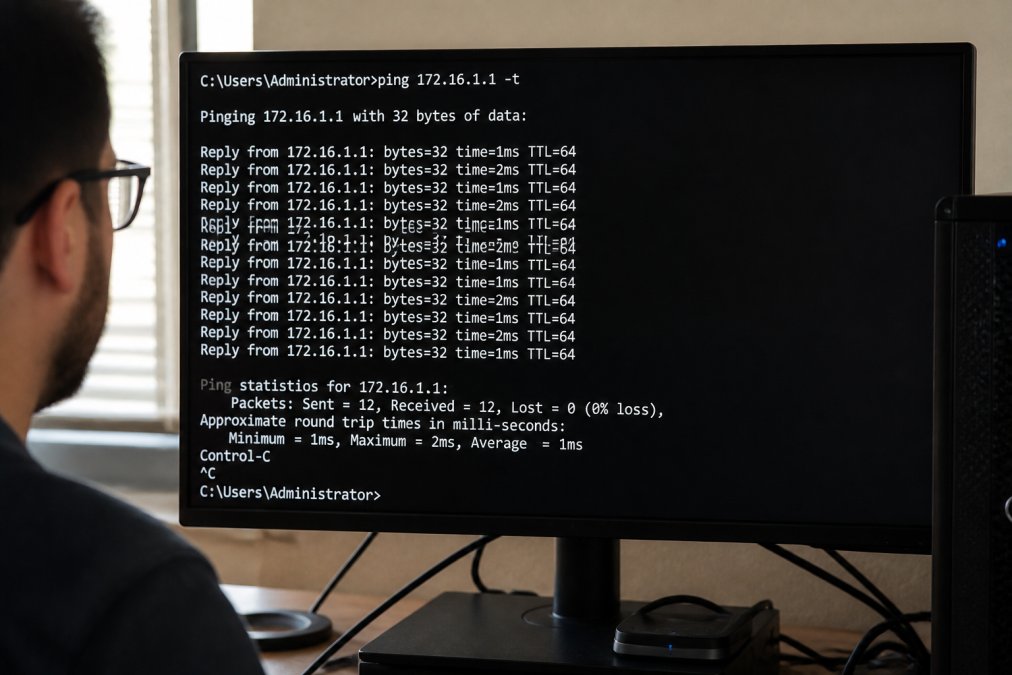
Access your VPS via Remote Desktop, open a command prompt, and use the ping command to measure latency to your broker’s server: ping [broker-server-address]. The output shows response times in milliseconds.
Run the ping test multiple times throughout different market hours to capture latency variation. Document the results: average latency, minimum latency, maximum latency, and packet loss percentage. Packet loss indicates network instability; even 1-2% packet loss is problematic for trading. Ideally, you should see zero packet loss and consistent latency within a narrow range.
Compare results across multiple VPS providers before making a final decision. A provider showing 15-20 milliseconds average latency with zero packet loss outperforms a cheaper provider with 80-100 milliseconds latency.
Choosing a VPS for MT5 trading requires balancing latency, reliability, hardware specifications, and cost. The right choice depends on your trading strategy’s specific demands. Start by testing latency to your broker’s servers, then select a provider that delivers consistent, low-latency performance in your target geographic region. With proper configuration and security practices, a VPS becomes the reliable backbone for professional automated trading.
Get started with EZMT5 and deploy our fully built, optimized MT5 trading systems on your VPS infrastructure. Our professional systems are designed for immediate deployment, delivering real-time trade opportunities with improved entries and exits. With two license keys per system that can be changed anytime and no contracts required, you can scale your trading infrastructure exactly when you’re ready. Sign up now and start trading like a pro within hours of VPS setup.
Frequently Asked Questions
Q: Do I need a VPS to run MT5 automated trading systems?
A: A VPS is not strictly required, but it’s highly recommended for serious traders running automated systems. Your home computer must stay powered on 24/7 for expert advisors to execute trades. A VPS keeps your trading platform running round-the-clock without interruption, ensuring you don’t miss trading opportunities due to network issues, power outages, or system restarts. This is especially critical if you’re using algorithmic trading strategies that rely on consistent execution speed.
Q: What latency should I target for MT5 trading?
A: Target latency under 50 milliseconds (ms) for reliable execution. Latency is the time delay between when your order is sent and when the broker receives it. High-frequency trading benefits from latencies under 10ms, while standard algorithmic trading strategies typically perform well under 100ms. Network delay directly affects slippage and order execution speed, so proximity to your broker’s data center matters significantly. Test your VPS latency using ping tools to measure round-trip time to your broker’s servers.
Q: How much RAM and CPU do I need for MT5 automated trading?
A: Start with at least 2 vCPU cores and 4GB RAM for running multiple expert advisors on MT5. If you’re backtesting or running 10+ simultaneous trading systems, allocate 4-8 vCPU and 8-16GB RAM. NVMe storage is essential for fast data access during backtesting and live trading. Your actual requirements depend on how many expert advisors you’re running and how complex your algorithmic trading strategies are. Monitor resource usage after deployment and scale up if you encounter execution delays.
Q: What’s the difference between managed and unmanaged VPS hosting for trading?
A: Managed VPS includes technical support, security updates, and server maintenance handled by the provider. Unmanaged VPS requires you to handle all configuration, security patches, and troubleshooting yourself. For traders, managed hosting reduces operational burden and ensures server stability, though it typically costs more. Unmanaged hosting offers more control and lower costs if you have technical expertise. Consider your comfort level with Windows Server administration and whether you prefer dedicated resources or shared infrastructure when making this choice.
This article was written using GrandRanker