
Table of Contents
- What Are Automated TradingView Indicators and How Do They Work?
- Top Best Automated TradingView Indicators Ranked for 2026
- How to Automate TradingView Alerts Into Live Trade Execution
- TradingView Auto-Trading Bots: Platform Comparison
- Pine Script Automated Trading Examples That Actually Work
- Best TradingView Strategies for Automation: Day Trading and Trend Following
- Risk Management and What to Ignore in Automated Trading
- Conclusion
Last Updated: June 6, 2026
Choosing the wrong indicator for automation can silently drain your account through bad entries, repainting signals, and execution lag. The best automated tradingview indicators in 2026 are not simply the most popular ones on the TradingView public library, they are the ones that generate reliable, non-repainting signals that survive the trip from alert to live broker execution. This guide from EZMT5 covers which indicators earn that distinction, how to wire them into a live trading system, and the hidden risks most automation guides skip.
Most traders assume automation is the hard part. The real challenge is signal quality. A bot executing bad signals faster just loses money faster.
What Are Automated TradingView Indicators and How Do They Work?
An automated TradingView indicator is a Pine Script-based tool that generates conditional signals, bullish, bearish, or neutral, and triggers TradingView Alerts routed to external execution systems via webhook. The indicator itself does not place trades. It identifies conditions based on price action, volume, or derived metrics, then fires an alert payload that a broker bridge interprets as an order instruction.
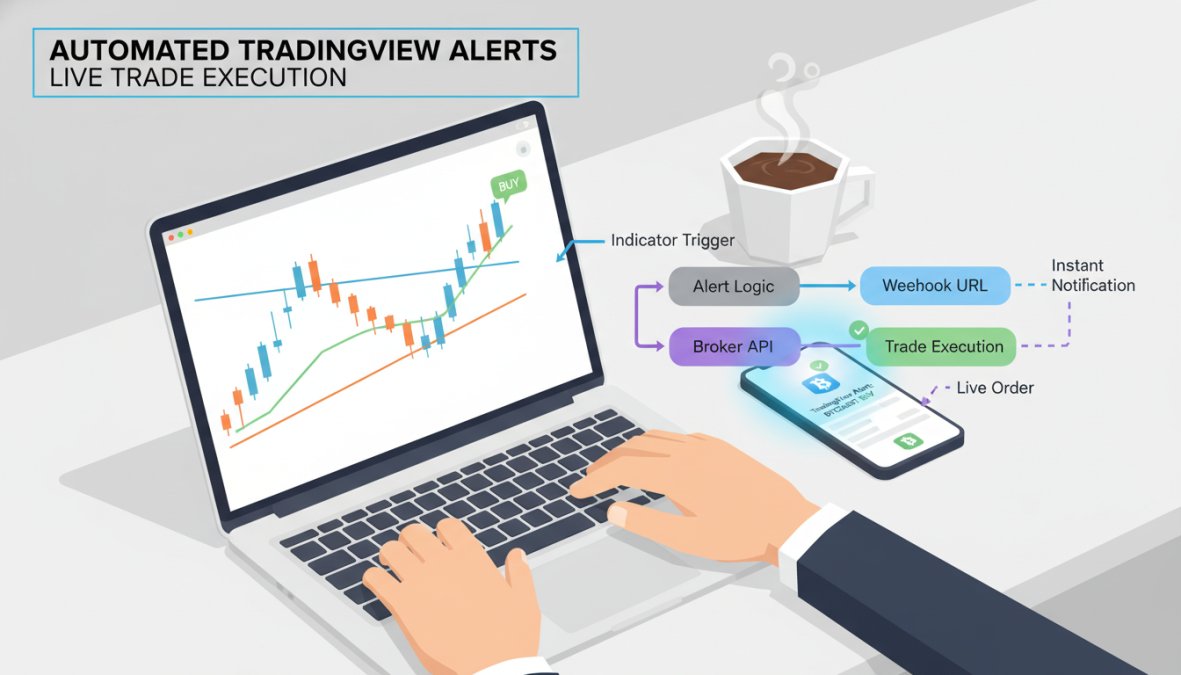
The workflow has three layers: signal generation (the indicator), alert routing (TradingView’s webhook system), and trade execution (a broker API or platform like MetaTrader 5). Each layer introduces its own failure points, which is why understanding the full chain matters before committing capital.
According to TradingView’s official Pine Script documentation, Pine Script v5 supports persistent variables, multi-timeframe requests, and complex conditional logic, making it capable of producing institutional-grade signal logic at the retail level.
Built-In Indicators vs. Custom Pine Script Indicators
TradingView ships with hundreds of built-in indicators, Moving Averages, RSI, MACD, Bollinger Bands, and more. These are reliable and transparent, but cannot be combined into a single automated signal without custom Pine Script logic wrapping them. Custom Pine Script indicators solve that problem, allowing traders to combine RSI divergence, ATR-normalized volatility filters, and market structure breaks into a single alert condition. The tradeoff: custom scripts require vetting, as closed-source scripts from unknown developers carry real risks including data snooping bias and, more critically, repainting.
The Repainting Problem: What Every Trader Must Understand
Repainting is the most misunderstood risk in automated TradingView trading. A repainting indicator recalculates historical bars as new price data arrives, making past signals appear more accurate than they were at generation time. In backtesting it looks exceptional; in live trading it executes on signals that will later disappear from the chart. The fix is straightforward: always use barstate.isconfirmed in Pine Script to ensure signals only fire on closed bars.
Never automate an indicator without checking whether its alerts fire on `barstate.isconfirmed` or on the current open bar. Repainting indicators produce backtests that look profitable but destroy live accounts. This is the most common and most expensive mistake in retail algo trading.
Top Best Automated TradingView Indicators Ranked for 2026
The indicators below are ranked on four criteria: signal reliability, automation compatibility, transparency of logic, and real-world execution behavior. Several of the most-downloaded scripts on TradingView’s public library fail the repainting test.

(/benefits-of-automated-trading-mt5/)View Indicators Ranked for 2026]
1. EZMT5 TradingView Indicator Suite
Best for: Traders who want professionally built, immediately deployable automated systems without weeks of configuration.
EZMT5 is our top pick for the best automated tradingview indicators in 2026. The suite provides instant, unlimited access to 11 professional, fully built, and optimized MT5 Trading Systems and TradingView indicators, ready to deploy immediately after download, with no Pine Script debugging required. Every future trading system is included automatically, meaning the suite grows with the market at no additional cost.
Pros:
- Fully built and optimized, no configuration required
- Unlimited access to 11 professional MT5 and TradingView indicators
- All future systems included
- Two flexible license keys per system
- Cancel anytime, no contracts
Best for: Serious traders who want to start trading immediately with professional-grade tools, not spend months building and debugging their own systems.
2. LuxAlgo Signal Suite
LuxAlgo offers an AI-assisted indicator architect that lets traders build and customize signal logic without writing raw Pine Script. Webhook integration connects signals directly to broker APIs, and the backtesting engine simulates entries and exits against historical data. Starting at $39.99/month with a free tier available, it’s competitive for traders who want a premium indicator library with community support. The honest limitation: advanced AI features are locked behind higher-tier subscriptions, making the entry-level plan feel incomplete for serious automation work.
Pros: Extensive indicator library, strong educational resources, AI-powered customization
Cons: Core automation features require the top-tier plan

3. Supertrend and Hull Suite (Open-Source Classics)
Supertrend and Hull Moving Average Suite are the workhorses of open-source TradingView automation, transparent, non-repainting when configured correctly, and widely supported by bridge services. Supertrend excels at trend-following in volatile markets using ATR-normalized bands; Hull Suite reduces lag in moving average crossover signals. The key advantage is auditability: you can read every line of Pine Script, verify alert logic, and confirm there is no repainting before connecting to a live account.
4. Volume Profile and Market Structure Indicators
Volume Profile indicators map traded volume at specific price levels, identifying high-volume nodes that act as support and resistance. Combined with market structure indicators tracking pivot highs and lows, these tools give automated systems context that pure price-action indicators miss. When price approaches a high-volume node, a bullish signal carries higher conviction than the same signal in a low-volume zone.
| Indicator | Type | Repainting Risk | Automation Ready | Best Timeframe |
|---|---|---|---|---|
| EZMT5 Suite | Professional/Optimized | Low | Yes | Multi-timeframe |
| LuxAlgo Signal Suite | AI-assisted | Low (verified) | Yes | All |
| Supertrend | Trend-following | Low (confirmed bars) | Yes | 1H+ |
| Hull Suite | MA crossover | Low | Yes | 15M+ |
| Volume Profile | Volume analysis | None | Partial | Daily/Weekly |
| Market Structure | Price action | Low | Yes | 1H+ |
How to Automate TradingView Alerts Into Live Trade Execution
Connecting TradingView indicators to live execution is a three-step process: configure the indicator alert, set up the webhook receiver, and map the alert message to broker order syntax. Getting any one step wrong produces silent failures, the alert fires, nothing executes, and you find out hours later.
Setting Up Webhooks and API Integration
TradingView’s alert system supports webhook delivery to any URL that accepts a POST request. The alert message body is a JSON payload your bridge service parses into order instructions. A typical alert message for a long entry looks like:
{"action": "buy", "symbol": "{{ticker}}", "price": "{{close}}", "qty": 1}
The webhook URL points to your bridge service, PineConnector for MetaTrader accounts (starting at $59.90/month), 3Commas for crypto exchanges (starting at $22/month), or Capitalise.ai for no-code automation (free tier available). Match your alert message format to the bridge you are using before going live.
A practical checklist before activating any automated alert:
- Confirm the indicator fires on
barstate.isconfirmedonly - Test the webhook with a paper trading account for at least 20 signals
- Verify the alert message JSON matches your bridge’s expected format
- Set position size limits in the bridge, not just in the indicator
- Enable trade logging for post-execution audit
Latency and Execution Speed: The Hidden Variable
TradingView alert delivery is not instantaneous, there is a delay between bar close, alert generation, webhook delivery, and broker order submission. On a 1-minute chart, that delay can represent a meaningful portion of the expected move. PineConnector advertises millisecond-level latency from alert receipt to MT4/MT5 order placement, but actual end-to-end latency depends on TradingView’s server load, webhook server location, and broker execution speed.
Run your automation on the 15-minute timeframe or higher when starting out. Latency impact is proportionally smaller on longer timeframes, and signal quality tends to be higher. Scale to shorter timeframes only after confirming the system is profitable on higher timeframes.
TradingView Auto-Trading Bots: Platform Comparison
The bridge service you choose determines your execution quality, broker compatibility, and risk management capabilities.
Cost-Benefit Analysis of Leading Automation Tools
| Platform | Starting Price | Best For | Key Limitation |
|---|---|---|---|
| PineConnector | $59.90/month | MT4/MT5 traders | Requires MetaTrader setup |
| 3Commas | $22/month | Crypto automation | Crypto exchanges only |
| Capitalise.ai | Free | No-code beginners | Limited broker partners |
| AlgoTest | Contact for pricing | Indian market | Primarily Indian instruments |
| TrendSpider | Contact for pricing | Automated charting | No direct order execution |
| AlgoBuilderX | Contact for pricing | Visual logic builders | Smaller community |
PineConnector is the strongest choice for traders on MetaTrader-compatible brokers, the latency performance justifies the monthly cost at any reasonable trading volume. For crypto-only traders, 3Commas offers the most mature ecosystem with DCA and grid bot templates. Capitalise.ai’s free tier is useful for testing automation logic before committing to a paid bridge, but treat it as a proof-of-concept tool, not a production system.
According to Investopedia’s guide to algorithmic trading, the primary cost drivers in automated trading are not platform fees but slippage and missed signals, both directly affected by the bridge service’s execution architecture.
Pine Script Automated Trading Examples That Actually Work
The gap between a Pine Script indicator that looks good in backtesting and one that performs live comes down to three things: signal confirmation logic, multi-timeframe alignment, and the absence of repainting.
Indicator Correlation Analysis: Combining RSI, MACD, and ATR-Normalized Signals
The common mistake is treating RSI, MACD, and Bollinger Bands as independent vote-casters. RSI and MACD are both momentum oscillators derived from price, correlated by construction, so their agreement is less meaningful than it appears. A stronger approach uses indicators from different signal families:
- Trend filter: Supertrend or Hull Suite (direction bias)
- Momentum confirmation: RSI divergence or Stochastic Oscillator (entry timing)
- Volatility gate: ATR-normalized bands or Bollinger Band width (avoid low-volatility chop)
- Volume confirmation: Volume Profile node proximity (conviction filter)
When all four conditions align on a confirmed bar, signal quality is materially higher than any two-indicator combination.
Pine Script Security Audits: Protecting Your Strategy
Closed-source Pine Script indicators cannot be verified for repainting, data snooping, or malicious logic. Before automating any closed-source indicator with real capital, check the following:
- Does the script use
request.security()withlookahead = barmerge.lookahead_on? This is a repainting red flag. - Are alerts triggered on
barstate.isconfirmedor on the open bar? - Does the script make external HTTP calls or access unusual permissions?
As documented in Pine Script v5 language reference manual, the lookahead parameter in request.security() is the most common source of unintentional repainting in published scripts. For open-source scripts, this audit takes 15 minutes.
Never deploy a closed-source Pine Script indicator to a live automated account without at least 30 days of paper trading validation. Published backtesting windows are often calculated with lookahead bias, making them completely unreliable as forward performance estimates.
Best TradingView Strategies for Automation: Day Trading and Trend Following
The best automated tradingview indicators are only as good as the strategy framework they operate within. Two frameworks dominate retail automation: day trading systems targeting intraday moves, and trend-following systems holding positions across days or weeks.
Support and Resistance Strategies Using Pivot Highs and Lows
Support and resistance strategies built on pivot highs and lows are among the most automation-friendly approaches available. The logic is mechanical: price breaks above a confirmed pivot high generates a bullish signal; a break below a confirmed pivot low generates a bearish signal. Use ta.pivothigh() and ta.pivotlow() to identify structural levels, then trigger alerts when price closes beyond them on a confirmed bar. Add a volume filter to avoid low-conviction breakouts. This approach performs best on the 1-hour and 4-hour charts, where pivot levels carry more structural significance and execution latency has less impact on entry quality.
Trend Exhaustion and Volatility Filters with Bollinger Bands and Stochastic Oscillator
Trend exhaustion signals identify when a directional move is losing momentum before the reversal becomes obvious. When Bollinger Band width is above its 20-period average (volatility expansion confirmed) and the Stochastic crosses below 80 from overbought territory, a bearish exhaustion signal is flagged. Apply only in the direction of the higher-timeframe trend to avoid counter-trend fades. This combination is particularly effective in crypto automation, where volatility regimes shift quickly and exhaustion signals tend to be sharp and actionable.
Risk Management and What to Ignore in Automated Trading
Automated trading removes emotional decision-making. It does not remove risk. The most common failure mode for well-designed systems is inadequate position sizing and the absence of a system-level circuit breaker.
Position sizing should be defined at the bridge level, not inside the indicator, this separates signal logic from capital allocation logic, making each easier to test independently. A fixed fractional approach, risking a consistent percentage of account equity per trade, is more durable than fixed lot sizing as account value changes. What to ignore: win rate as a primary optimization target. A system with a lower win rate but favorable risk-reward ratio will outperform a high-win-rate system with poor risk management over any meaningful sample size.
According to the CFA Institute’s guidance on algorithmic trading risk, the key risk controls for automated systems are pre-trade checks, position limits, and automated kill switches, not the sophistication of the underlying signal logic.
The best automated trading systems are defined by their risk management architecture as much as their signal quality. A reliable circuit breaker that halts trading after a defined drawdown threshold protects capital during periods when market conditions no longer match the system’s assumptions.
Backtesting on a single instrument and timeframe, then deploying across multiple markets, is a critical error. Each market has its own volatility profile and liquidity characteristics. Walk-forward testing across multiple instruments and out-of-sample periods is the minimum standard before live deployment. Algo trading is not passive income, it requires active monitoring, periodic recalibration, and the discipline to shut down a system that is no longer performing as expected.
Finding the best automated tradingview indicators is straightforward. Building a complete system around them, with reliable execution, proper risk management, and audited signal logic, is where most traders stall. EZMT5 solves that problem directly: 11 professional, fully built, and optimized MT5 Trading Systems and TradingView indicators, ready to deploy immediately after download, with real-time trade opportunities, precision execution, and two flexible license keys per system on a no-contract subscription. Signup Now and start trading with a complete, professional-grade system from day one.
Frequently Asked Questions
Can TradingView indicators automatically execute trades?
TradingView indicators themselves generate buy and sell signals and alerts, but they cannot directly execute trades on a broker. To automate execution, you need a bridge tool such as PineConnector or 3Commas that receives TradingView webhook alerts and forwards them to your MetaTrader or crypto exchange account. This two-step setup is the standard approach for algo trading with TradingView indicators.
Do I need coding skills to use automated TradingView indicators?
Not necessarily. Many of the best automated TradingView indicators come fully built and ready to deploy, such as those offered by EZMT5 or LuxAlgo. If you want to create custom Pine Script automated trading examples or modify indicator logic, basic Pine Script knowledge helps. However, no-code platforms like Capitalise.ai and visual builders like AlgoBuilderX let you automate TradingView strategies without writing a single line of code.
What is the difference between a TradingView script and an automated indicator?
A TradingView script written in Pine Script can function as either a study (indicator) or a strategy. An indicator overlays signals on a chart and can fire TradingView alerts. An automated indicator goes further by being pre-configured to send those alerts via webhook to an execution platform. The automation layer, not the script itself, is what connects chart signals to real broker execution, making latency and reliability critical factors to evaluate.
Are automated TradingView indicators worth the cost?
It depends on your trading volume and consistency. Platforms like 3Commas start at $22/month and LuxAlgo at $39.99/month, while PineConnector runs $59.90/month. For active traders, the cost of precision execution, reduced slippage, and disciplined risk management typically outweighs subscription fees. A proper cost-benefit analysis should factor in your average trade frequency, account size, and whether the automation genuinely improves entries and exits over manual trading.
How do I connect TradingView indicators to a broker for automation?
The standard workflow is: configure your TradingView indicator to fire an alert with a JSON webhook message, then point that alert to a bridge service like PineConnector or AlgoTest. The bridge authenticates the signal and sends a trade order to your connected MetaTrader 4/5 account or supported broker. Ensure your alert message format matches the bridge's required syntax, and always test with a demo account before going live to verify execution speed and accuracy.
What is repainting and why does it matter for automated trading indicators?
Repainting occurs when a Pine Script indicator recalculates and changes its historical signals on closed bars, making past performance look better than it actually was. For automated trading, this is a serious risk: a backtested strategy may appear highly profitable, but live results will differ because the signals that triggered entries no longer exist on historical bars. Always verify whether an indicator uses confirmed bar data or real-time values before deploying it in a live automated trading system.
This article was written using GrandRanker