

Table of Contents
- What It Actually Means to Trade Like a Pro on MT5
- How to Set Up MT5 for Day Trading Like a Professional
- Best MT5 Indicators for Pro Traders: Technical Analysis That Works
- Professional Risk Management on MT5: Protecting Your Capital
- MT5 Automated Trading Strategies That Professionals Use
- How to Trade Like a Pro on MT5 Using a Trading Plan and Journal
- Regulatory, Tax, and Compliance Considerations for MT5 Traders
- Conclusion
Last Updated: May 26, 2026
Serious traders separate themselves from the retail crowd not through luck or raw intuition, but through disciplined infrastructure, tested systems, and ruthless self-accountability. If you want to know how to trade like a pro mt5, the answer starts before you place a single trade: it starts with how you configure your environment, how you manage risk, and how you review your own performance. This guide from EZMT5 covers every layer of that process, from platform setup and technical analysis to automated strategies, post-trade review, and the regulatory context most beginners never think about until it costs them.
The hard truth most guides skip: the majority of retail traders lose money not because markets are random, but because they trade without a structured edge. Below, we break down exactly how professionals approach MT5 in 2026, what separates their setups from amateur configurations, and how you can close that gap faster than you think.
What It Actually Means to Trade Like a Pro on MT5
Trading like a professional on MT5 is not about finding a magic indicator or copying someone else’s signals. It is a systematic approach that combines a tested strategy, disciplined risk management, and a psychological framework that keeps emotion out of execution.
The distinction matters because MetaTrader 5 is available to anyone. The platform itself does not create an edge. What creates an edge is how you use it.
The Professional Mindset vs. the Retail Mindset
Most retail traders approach the market looking for certainty. They want a setup that "always works." Professionals think in probabilities. They accept that any single trade can lose, and they size positions accordingly so that no single loss damages their overall capital.
The retail mindset chases volatility. The professional mindset respects it. Where a retail trader sees a fast-moving asset and thinks opportunity, a professional sees liquidity conditions, spread widening, and slippage risk. That reframe alone changes every decision that follows.
A common mistake is treating MT5 as a signal machine. The platform is a professional execution environment. Your edge comes from what you bring to it, not what it generates for you.
Trading Psychology and Consistency on MT5
Trading psychology is the discipline of maintaining consistent decision-making under conditions of uncertainty and financial pressure. On MT5, where one-click execution and real-time price feeds create constant stimulation, psychological discipline is what separates profitable months from blown accounts.
The most destructive psychological pattern in trading is revenge trading: increasing position size after a loss to "win it back." MT5’s built-in position management tools, including configurable lot sizes and risk calculators, exist precisely to remove this temptation from the equation.
Consistency is the real benchmark. A professional trader running a 55% win rate with a 1.5:1 reward-to-risk ratio will outperform a trader with a 70% win rate and poor position sizing over any meaningful sample size. The goal is not to be right. The goal is to be profitable over hundreds of trades.
Set MT5 to display your account equity in real-time on every chart workspace. Seeing your actual capital at risk, not just open P&L, changes how you size positions and reinforces risk discipline during high-volatility sessions.
How to Set Up MT5 for Day Trading Like a Professional
Professional MT5 configuration is the foundation everything else rests on. Get this wrong and even a good strategy underperforms.
A focused trader sitting at a triple-monitor desktop setup with MT5 charts across all screens, a clean organized desk, professional warm lighting, and a physical trading journal open beside a mechanical keyboard.

Hardware and Connectivity Requirements for Serious Traders
Day trading on MT5 demands hardware that eliminates execution lag and display bottlenecks. The minimum professional setup for active day trading or swing trading includes:
- Processor: Intel Core i7 or AMD Ryzen 7 (8-core minimum for running multiple MT5 instances and Expert Advisors simultaneously)
- RAM: 16GB minimum, 32GB recommended if running backtesting alongside live charts
- Monitors: Dual or triple monitor configuration; 24-inch 1080p minimum per screen
- Internet connection: Wired Ethernet connection with at least 50Mbps download and under 20ms ping to your broker’s server
- Backup connection: A mobile hotspot as a failover during live positions is non-negotiable
Execution speed matters more in day trading than swing trading. For forex and crypto scalping on MT5, latency between your terminal and the broker’s execution server directly affects fill quality. Many professional traders use VPS (Virtual Private Server) hosting located in the same data center as their broker to minimize this gap.
According to Investopedia’s guide to trading infrastructure, execution latency is one of the most underestimated factors in short-term trading performance, particularly for strategies that depend on precise entry and exit timing.
Configuring MT5 Workspace, Profiles, and Execution Speed
MT5 profiles let you save and instantly load complete workspace configurations, including chart layouts, indicator settings, and timeframe arrangements. Professional traders maintain separate profiles for different asset classes: one for forex pairs, one for crypto, one for indices.
Key configuration steps for a professional MT5 day trading setup:
- Set one-click trading enabled under Tools > Options > Trade tab
- Configure default lot sizes per instrument to match your risk per trade
- Build template files for each chart setup you use regularly (indicators, colors, timeframes)
- Assign keyboard shortcuts for order types you use most frequently
- Set up alerts on key price levels before each session so you are not watching screens continuously
The MT5 Depth of Market (DOM) window is underused by retail traders. Professionals monitor order flow through the DOM to gauge short-term supply and demand imbalances before entering positions.
Never run MT5 Expert Advisors on a standard home PC that sleeps or restarts automatically. Automated strategies require 24/7 uptime. Use a VPS or dedicated machine that stays online during all trading sessions, or your EA will miss entries and potentially leave positions unmanaged.
Best MT5 Indicators for Pro Traders: Technical Analysis That Works
The best MT5 indicators for pro traders are not the most complex ones. They are the ones that clearly define trend direction, momentum, and key price levels without cluttering the chart with contradictory signals. The difference between a professional indicator setup and a retail one is not which indicators are used, it is how they are configured, layered, and interrogated across multiple timeframes before a single order is placed.
Most professional MT5 setups use three to five indicators maximum. More than that creates analysis paralysis and conflicting signals that lead to missed trades or bad entries. The goal is confluence: multiple independent signals pointing to the same conclusion at the same time.
The Multi-Timeframe Confluence Framework
Professional traders on MT5 do not analyze a single chart. They work across at least three timeframes simultaneously, using what practitioners call a top-down analysis approach:
- Higher timeframe (HTF): Defines the dominant trend and major structural levels. For day traders, this is typically the 4-hour or daily chart. For swing traders, it is the weekly and daily.
- Intermediate timeframe (ITF): Identifies the setup, the pattern or condition that signals a potential trade. For day traders, this is the 1-hour chart.
- Entry timeframe (ETF): Provides the precise entry trigger. For day traders, this is the 15-minute or 5-minute chart.
A trade is only taken when all three timeframes agree. If the daily chart shows a downtrend but the 15-minute chart shows a bullish setup, a professional does not take the long. The higher timeframe always has veto power.
To implement this in MT5, use the Profiles feature to save a three-chart layout with linked symbols. When you click a symbol in the Market Watch window, all three charts update simultaneously, eliminating the risk of analyzing different instruments by accident.
RSI: How Professionals Actually Use It
RSI (Relative Strength Index) is a momentum oscillator that measures the speed and magnitude of recent price changes on a scale of 0 to 100. The standard setting is a 14-period lookback, but professional traders frequently adjust this based on their timeframe and asset class:
- 9-period RSI on lower timeframes (5-minute, 15-minute) for faster momentum signals in day trading
- 14-period RSI on hourly and 4-hour charts as the standard intermediate-timeframe setting
- 21-period RSI on daily charts for smoother, less noisy trend confirmation
Professional traders use RSI primarily for divergence, not overbought/oversold readings. Overbought/oversold signals in a strong trend are routinely wrong, a market can stay above RSI 70 for weeks in a strong uptrend. Divergence is more reliable:
- Bearish divergence: Price makes a higher high, but RSI makes a lower high. Momentum is weakening even as price rises, a potential reversal signal.
- Bullish divergence: Price makes a lower low, but RSI makes a higher low. Selling pressure is exhausting, a potential reversal signal.
The key rule: divergence signals are only acted on when they form at a structurally significant price level, a prior swing high/low, a major moving average, or a round-number psychological level. Divergence in the middle of a range is noise.
To add RSI in MT5: Insert > Indicators > Oscillators > Relative Strength Index. Set the period, apply to Close, and add horizontal lines at 30, 50, and 70 for visual reference.
Moving Averages: Configuration and Interpretation
Moving averages define trend direction and act as dynamic support and resistance. The most widely used combination in professional forex and equity index trading is the 20 EMA and 50 EMA on the primary analysis timeframe. A third moving average, the 200 EMA, is added on the higher timeframe as the macro trend filter.
How professionals interpret the EMA stack:
| EMA Configuration | Market Condition | Professional Bias |
|---|---|---|
| Price above 20 EMA, 20 above 50 EMA | Strong uptrend | Long only, no shorts |
| Price between 20 EMA and 50 EMA | Pullback in uptrend | Wait for reclaim or continuation signal |
| Price below 20 EMA, 20 below 50 EMA | Strong downtrend | Short only, no longs |
| EMAs tangled, price crossing repeatedly | Ranging/choppy market | Reduce position size or stand aside |
The 200 EMA on the daily chart is the single most widely watched moving average across institutional and retail participants. Price reactions at the 200 EMA tend to be significant precisely because so many participants are watching it, a self-fulfilling structural level.
In MT5, apply EMAs via Insert > Indicators > Trend > Moving Average. Select Exponential as the method. Color-code each EMA differently (for example, 20 EMA in blue, 50 EMA in orange, 200 EMA in red) and save the configuration as a chart template for instant reuse across instruments.
Chart Patterns: Reliability Conditions Professionals Check
Chart patterns are visual representations of supply and demand imbalances. The patterns with the highest reliability in professional use include:
- Head and shoulders / inverse head and shoulders (reversal at major structural highs/lows)
- Bull and bear flags (continuation after a sharp impulsive move)
- Ascending and descending triangles (breakout setups with defined pressure points)
- Double tops and double bottoms (reversal confirmation with volume divergence)
What most guides omit: chart patterns have reliability conditions that professionals check before acting on them. A pattern that forms in isolation is far less reliable than one that forms with all of the following present:
- Structural confluence: The pattern completes at a prior swing high/low or a key moving average level
- Timeframe agreement: The pattern is visible on the intermediate timeframe and the higher timeframe is not in direct opposition
- Volume behavior: On MT5, the built-in volume indicator (tick volume) should show declining volume during the consolidation phase of a flag or triangle, and expanding volume on the breakout candle
- Clean measured move target: The pattern provides a logical price target (for example, the flagpole height projected from the breakout point) that gives a minimum 1.5:1 reward-to-risk ratio at your planned stop-loss distance
If all four conditions are not present, the pattern is noted but not traded. This filter alone eliminates the majority of false breakouts that retail traders act on.
Understanding Market Orders vs. Limit Orders on MT5
A market order is an instruction to buy or sell immediately at the current available price. Market orders guarantee execution but not price, making them suitable for entering trending markets where speed matters more than precision, or for exiting a position quickly when a stop-loss is breached.
A limit order is an instruction to buy or sell only at a specified price or better. Limit orders guarantee price but not execution, making them the preferred entry method for professional traders who wait for price to return to a defined level, a moving average, a prior support/resistance zone, or the base of a flag pattern, before entering.
On MT5, the full order type matrix available to professional traders:
| Order Type | Use Case | Price Guarantee | Execution Guarantee |
|---|---|---|---|
| Market Order | Immediate entry in fast-moving markets | No | Yes |
| Limit Order | Entry at a specific price level on a pullback | Yes | No |
| Buy Stop / Sell Stop | Breakout entries above or below current price | No | Conditional |
| Buy Stop Limit / Sell Stop Limit | Breakout trigger with limit price control | Partial | Conditional |
| Trailing Stop | Dynamic exit that follows price in your favor | N/A | Conditional |
Professional traders combine limit orders for entries with stop orders for exits. This combination maximizes entry precision while automating risk management. The trailing stop, available natively in MT5, is particularly useful in trending markets: it locks in profit as price moves in your favor while giving the trade room to continue running.
One MT5-specific execution detail most guides miss: when using pending orders (limit or stop orders placed in advance), MT5 allows you to attach a stop-loss and take-profit directly to the pending order at the time of placement. This means your risk parameters are defined and automated before the trade even triggers, removing any temptation to adjust them once you are in a live position.
Save your most-used indicator combinations as MT5 chart templates (right-click chart > Template > Save Template). Create one template per strategy type, for example, ‘Trend_Following_EMA_RSI’ and ‘Reversal_Divergence_Setup’, so you can apply a complete professional configuration to any new chart in under three seconds.
Professional Risk Management on MT5: Protecting Your Capital
Risk management is where trading careers are made or ended. No strategy survives poor risk management, and many mediocre strategies become profitable with disciplined position sizing. This is the section most traders read last and should read first.
Stop-Loss, Take-Profit, and Drawdown Control
A stop-loss is a pre-defined price level at which a losing trade is automatically closed to prevent further loss. On MT5, stop-losses can be set at order entry or modified after a position is open. Professional traders set stop-losses before entry, not after, because emotional attachment to an open position distorts judgment.
A take-profit is the price level at which a winning trade is automatically closed to lock in gains. The ratio between your take-profit distance and your stop-loss distance defines your reward-to-risk ratio. Professional traders target a minimum 1.5:1 reward-to-risk ratio, meaning they risk one unit to potentially gain 1.5 units.
Drawdown is the peak-to-trough decline in account equity over a specific period. Managing maximum drawdown is the professional’s primary capital preservation tool. A common rule among professional traders: if a strategy hits a 10% drawdown from its equity peak, reduce position sizing by 50% until the drawdown recovers.
According to the CME Group’s risk management education resources, consistent drawdown control is one of the defining characteristics of long-term trading profitability across all asset classes.
use, Margin, and Capital Allocation Rules
use is the ability to control a position larger than your actual capital. On MT5, brokers offer varying use levels depending on the instrument and regulatory jurisdiction. High use amplifies both gains and losses proportionally.
The professional approach to use is conservative. Many successful traders use far less than the maximum available use, particularly in volatile asset classes like crypto or during major economic news events.
Capital allocation rules that professional traders follow:
- Risk no more than 1-2% of total account equity on any single trade
- Never allocate more than 5-10% of total capital to correlated positions simultaneously
- Keep a cash reserve (typically 20-30% of account) available for high-conviction setups
- Reduce position size during drawdown periods, not increase it
Margin is the collateral your broker holds while you have an open used position. Understanding margin requirements per instrument on MT5 is essential before sizing positions, particularly in highly used forex or index CFD trading.
The single most important risk management rule: define your maximum loss per trade as a percentage of equity before you open the platform each day. Write it down. This removes the temptation to “let it run a little longer” when a trade moves against you.
MT5 Automated Trading Strategies That Professionals Use
Automation is where MT5 genuinely separates itself from basic retail trading platforms. Expert Advisors (EAs) allow traders to encode their strategy logic into an algorithm that executes trades automatically based on predefined conditions, removing emotion from execution entirely.
Backtesting Your Strategy Before Going Live
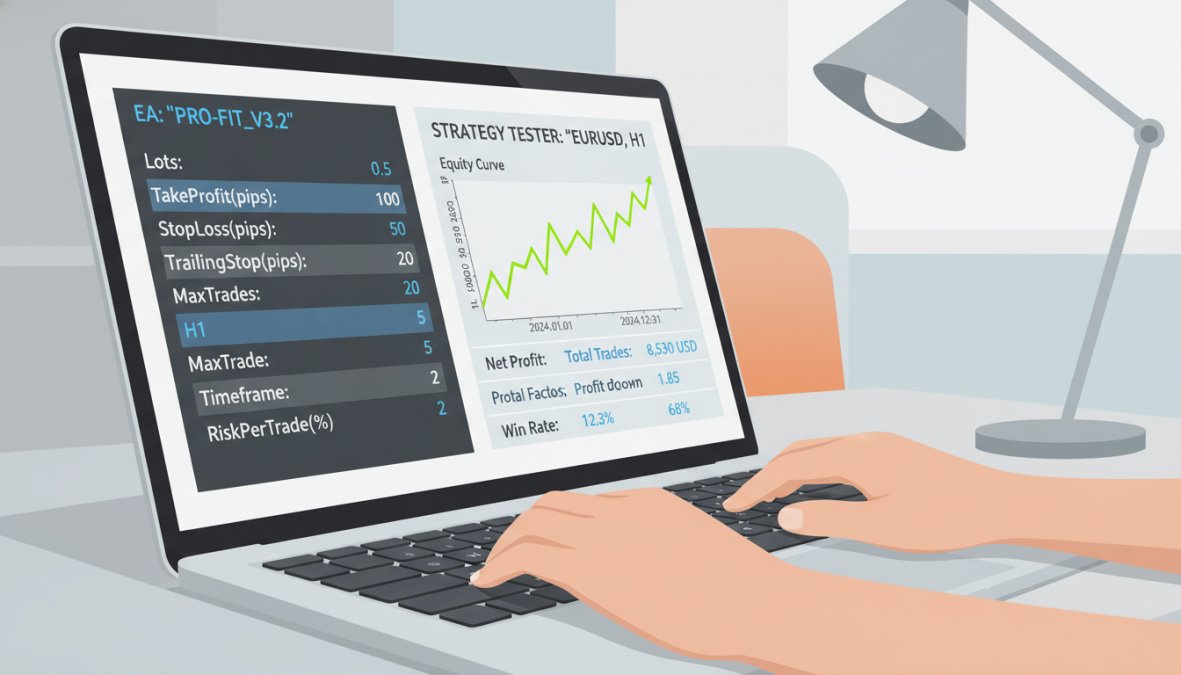
Backtesting is the process of running a trading strategy against historical price data to evaluate how it would have performed. MT5’s built-in Strategy Tester is one of the most capable backtesting environments available to retail traders, supporting both single-currency and multi-currency testing with tick-by-tick data accuracy.
The professional backtesting process on MT5:
- Define your strategy rules in precise, unambiguous terms (entry conditions, exit conditions, position sizing)
- Code the strategy as an Expert Advisor or use a pre-built EA framework
- Run the Strategy Tester on at least 3-5 years of historical data per instrument
- Analyze the results: focus on maximum drawdown, profit factor, and consistency across different market conditions
- Forward-test on a demo account for a minimum of 30-60 trading days before going live
- Run a small live account in parallel with the demo to account for real execution conditions
What most backtesting guides miss: a strategy that performs well in trending markets often fails in ranging markets. Always segment your backtesting results by market condition, not just overall profitability.
Proprietary Trading Firm Pathways Using MT5 Systems
Proprietary trading firms (prop firms) fund traders with firm capital in exchange for a profit split, typically after the trader passes an evaluation challenge. MT5 is the dominant platform for prop firm evaluations in 2026, making professional-grade MT5 skills directly transferable to a funded trading career.
The typical prop firm pathway:
- Pass a two-phase evaluation (Phase 1: hit profit target; Phase 2: demonstrate consistency)
- Receive funded account ranging from $10,000 to $200,000+ depending on the firm
- Trade within defined risk parameters (daily loss limits, maximum drawdown)
- Receive profit splits typically ranging from 70% to 90% to the trader
The evaluation rules of most prop firms mirror professional risk management principles exactly: daily loss limits, maximum drawdown caps, and consistency requirements. Traders who have already built disciplined MT5 habits pass evaluations significantly more reliably than those who have not.
EZMT5 provides access to 11 fully built and optimized MT5 trading systems that are ready to deploy immediately after download, giving traders a tested structural edge for both personal accounts and prop firm evaluations.
How to Trade Like a Pro on MT5 Using a Trading Plan and Journal
Understanding how to trade like a pro mt5 without a trading plan is like navigating without a map. The plan is not optional. It is the document that defines your edge, your rules, and your performance benchmarks, and it is the single artifact that separates a trader who is building a business from one who is gambling with a sophisticated interface.
Most guides tell you to keep a trading journal. Almost none tell you exactly what to record, how to review it, or how to extract the specific insights that actually change behavior. This section provides both: a professional trading plan structure and a post-trade analysis framework specific enough to implement today.
Building a Professional MT5 Trading Plan
A professional trading plan is a written document, not a mental checklist, that answers every operational question before the market opens. When you are in a live position with real capital at risk, your judgment is compromised by stress and recency bias. The plan exists to make decisions in advance, when your thinking is clear.
A complete professional trading plan includes the following components:
1. Market and Instrument Selection
Specify exactly which instruments you trade and why. Include the typical spread range, the trading hours you participate in, and the minimum average daily range (ADR) required for the instrument to be tradeable under your strategy. Instruments that do not meet your ADR threshold on a given day are skipped, regardless of how good the setup looks.
2. Strategy Rules (Entry Conditions)
Write your entry conditions in precise, testable language. ‘The market looks bullish’ is not a rule. ‘Price is above the 50 EMA on the 1-hour chart, RSI on the 15-minute chart has crossed above 50 from below, and a bull flag has completed with a close above the flag’s upper boundary’ is a rule. If another trader cannot execute your strategy from your written description alone, the description is not specific enough.
3. Risk Parameters
Define:
- Maximum risk per trade as a percentage of account equity (most practitioners use 1-2%)
- Maximum number of simultaneous open positions
- Maximum daily loss limit (the point at which you stop trading for the day, regardless of setups)
- Maximum weekly drawdown before reducing position size
4. Session Schedule
Specify which trading sessions you participate in (London open, New York open, overlap) and which you explicitly avoid (Asian session for forex majors if your strategy requires volatility, for example). Include a rule about trading around high-impact news events, most professional retail traders either close positions before major releases or stand aside entirely.
5. Exit Rules
Define your take-profit logic (fixed target, trailing stop, or partial close at 1:1 with remainder to run), your stop-loss placement methodology (below the most recent swing low for longs, above the most recent swing high for shorts), and the conditions under which you will exit a trade early before either level is hit.
6. Performance Benchmarks
Define what constitutes acceptable performance over a rolling 20-trade sample: minimum acceptable win rate, minimum acceptable average reward-to-risk ratio, and the profit factor threshold below which you pause trading to review the strategy. Without benchmarks, you cannot distinguish a strategy that is failing from one that is in a normal drawdown period.
Store your trading plan as a PDF and review it every Sunday before the trading week begins. If you find yourself wanting to deviate from a rule mid-session, that deviation must be logged in your journal, not acted on silently. The discipline of logging deviations is what reveals whether a rule needs updating or whether you are rationalizing an emotional decision.
Post-Trade Analysis Frameworks to Accelerate Growth
A trading journal is the professional’s most underrated performance tool. The gap between traders who plateau and traders who compound their skill over time is almost always traceable to the quality of their post-trade review process. Recording every trade creates a data set. Reviewing that data set systematically is what converts experience into expertise.
The framework below is structured around three review layers, each operating at a different time horizon and answering a different question. This is the content gap that almost no competitor covers at actionable depth.
Layer 1: Trade-Level Review (completed within 30 minutes of closing each trade)
This review captures the raw facts and your immediate assessment before memory degrades. Record the following fields for every trade:
| Field | What to Record |
|---|---|
| Instrument | Exact symbol as it appears in MT5 |
| Date and time of entry | From MT5 account history |
| Date and time of exit | From MT5 account history |
| Direction | Long or Short |
| Entry price | Exact fill price from MT5 |
| Stop-loss price | As placed at entry |
| Take-profit price | As planned at entry |
| Exit price | Actual close price |
| Position size (lots) | As executed |
| Risk in account currency | Calculated from stop distance × lot size |
| Actual P&L | From MT5 account history |
| Reward-to-risk achieved | Actual P&L ÷ risk amount |
| Setup type | Name of the pattern or condition that triggered entry |
| Plan-compliant entry? | Yes / No, was the entry condition met exactly as written? |
| Plan-compliant exit? | Yes / No, was the exit at the planned level or a deviation? |
| Deviation reason (if any) | One sentence describing what changed and why you deviated |
| Screenshot | MT5 chart screenshot at entry and exit timeframe, saved with trade ID |
The screenshot requirement is non-negotiable. Written descriptions of what a chart looked like are unreliable. A saved image is objective. MT5 allows you to export chart screenshots directly via File > Save As Picture, build this into your post-trade routine.
Layer 2: Session-Level Review (end of each trading session, before closing MT5)
This review zooms out from individual trades to assess the session as a whole. It takes approximately 10-15 minutes and answers the question: Was my decision-making process sound today, independent of outcomes?
Record the following:
- Setups seen vs. setups taken: How many valid setups appeared during the session? How many did you take? If you took more trades than valid setups appeared, you are overtrading. If you missed valid setups, identify whether it was hesitation, distraction, or a genuine reason.
- Emotional state rating: Score your emotional state during the session on a 1-5 scale (1 = calm and fully focused, 5 = anxious, frustrated, or revenge-trading). Any session rated 3 or above warrants a written note on what triggered the elevated state.
- Rule violations: List every instance where you deviated from your trading plan, including the specific rule violated and the rationalization you used in the moment. Patterns in your rationalizations are diagnostic, they reveal the specific emotional triggers that compromise your execution.
- Market condition assessment: Was the market trending, ranging, or choppy during your session? Did your strategy perform as expected given those conditions? If not, is this a strategy limitation or an execution error?
Layer 3: Weekly Performance Review (every Sunday, before the next trading week begins)
This is the strategic review layer. It operates on the full week’s data and answers the question: Is my strategy performing within expected parameters, and is my execution improving over time?
Calculate and record the following metrics from your trade log:
- Win rate for the week: Winning trades ÷ total trades
- Average reward-to-risk achieved: Sum of all R-multiples ÷ total trades (where 1R = your planned risk per trade)
- Profit factor: Gross profit ÷ gross loss (a profit factor above 1.5 is generally considered the threshold for a viable strategy)
- Largest single loss as a percentage of equity: This flags position sizing errors immediately
- Plan compliance rate: Plan-compliant trades ÷ total trades, expressed as a percentage
The plan compliance rate is the metric most traders never calculate and the one most predictive of long-term improvement. A trader with a 60% win rate and 95% plan compliance is building a sustainable edge. A trader with a 65% win rate and 60% plan compliance is getting lucky and does not know it yet.
The best trade / worst trade analysis:
Identify the single best trade and single worst trade of the week. For each, answer:
- What made the setup high or low quality?
- Was the execution consistent with the plan?
- What would you do differently, and does that difference warrant a rule change or was it a one-off condition?
If the same type of error appears in your worst trades across three or more consecutive weekly reviews, that is a structural problem in your plan or psychology, not random noise. That is the signal to adjust the relevant rule in your trading plan.
The compounding effect of structured post-trade review is not visible in a single week. It becomes visible over three to six months, when you can look back at your plan compliance rate trending upward, your average reward-to-risk improving, and your emotional state scores stabilizing. The journal is not a record of what happened, it is the mechanism by which you convert losing trades into future edge.
According to the CFA Institute’s resources on systematic trading review, traders who maintain structured performance reviews demonstrate measurably faster skill development than those who trade without post-trade analysis. The framework above operationalizes that finding into a repeatable weekly process that any MT5 trader can implement without additional software, MT5’s built-in account history export provides all the raw data the framework requires.
Regulatory, Tax, and Compliance Considerations for MT5 Traders
Most trading guides stop at strategy. This one does not, because regulatory and tax obligations are where underprepared traders get surprised at the worst possible moment.
Regulatory considerations depend on your jurisdiction and the instruments you trade. Forex and CFD trading on MT5 is subject to different regulatory frameworks depending on where your broker is registered and where you reside. Key regulatory bodies include the FCA (UK), ASIC (Australia), CySEC (Cyprus/EU), and the CFTC/NFA (United States). Always verify that your MT5 broker holds a valid license from a recognized regulator before depositing funds.
Tax treatment of trading profits varies significantly by country. In most jurisdictions, trading profits are subject to capital gains tax or income tax depending on whether you are classified as an investor or a professional trader. Day trading activity, in particular, is often classified as business income rather than capital gains, which carries different tax rates and reporting requirements.
Practical steps to stay compliant:
- Keep detailed records of every trade, including entry date, exit date, instrument, position size, and P&L (MT5’s built-in account history export makes this straightforward)
- Consult a tax professional familiar with financial trading in your jurisdiction before your first profitable year
- Understand the distinction between spread betting (tax-free in some jurisdictions) and CFD trading (typically taxable)
- If trading through a prop firm, clarify whether profit distributions are classified as employment income or trading income
Short selling and used positions in certain jurisdictions may also trigger additional reporting requirements. The regulatory landscape for crypto trading on MT5 is evolving particularly fast in 2026, with several major jurisdictions introducing new reporting frameworks for digital asset traders.
For authoritative guidance on financial trading regulations, the Financial Conduct Authority’s consumer guidance on CFD trading provides clear, jurisdiction-specific information that every MT5 trader should review before trading live.
Frequently Asked Questions
Is MT5 good for professional trading?
Yes, MT5 is widely used by professional traders across forex, crypto, and other asset classes. It supports advanced order types including market orders and limit orders, multi-timeframe technical analysis, automated Expert Advisors, and a built-in strategy tester for backtesting. Its execution speed, depth of market data, and support for hedging make it a strong choice for serious day trading and swing trading at a professional level.
What are the best MT5 settings for day trading?
For day trading on MT5, professionals typically configure one-click trading for fast execution, set up multiple chart windows with key indicators like RSI and moving averages, and enable real-time alerts. Adjusting the server connection to the nearest broker server reduces latency. Setting up predefined templates for different asset classes, such as forex or crypto, and enabling stop-loss and take-profit defaults on every order are also essential professional habits.
Can you automate trading on MT5?
Yes, MT5 supports full trade automation through Expert Advisors (EAs), which are algorithmic systems that execute trades based on predefined rules. Professional traders use EAs to remove emotional bias, improve entries and exits, and run strategies around the clock. Platforms like EZMT5 offer fully built and optimized MT5 trading systems that can be deployed immediately after download, giving traders instant access to automated, professional-grade strategies without needing to code from scratch.
Do professional traders use indicators on MT5?
Professional traders do use indicators on MT5, but selectively. Rather than overloading charts, pros typically rely on a small set of high-confidence tools, such as RSI for momentum, moving averages for trend direction, and volume-based indicators for order flow confirmation. MT5's built-in indicator library plus support for custom indicators allows traders to build a clean, focused technical analysis setup aligned with their specific trading strategy and asset class.
How do proprietary trading firms use MT5?
Many proprietary trading firms accept MT5 as a supported platform for funded trader evaluations and live accounts. Traders who pass prop firm challenges, which test risk management, drawdown limits, and profitability targets, can access firm capital to trade at scale. Using a proven MT5 automated trading strategy with strict stop-loss and capital allocation rules significantly improves the chances of passing these evaluations and building a sustainable trading career.
Mastering how to trade like a pro mt5 requires more than a good strategy: it demands professional infrastructure, disciplined risk management, systematic review, and compliance awareness working together. EZMT5 gives serious traders immediate access to 11 fully built and optimized MT5 trading systems, real-time trade opportunities, and the flexibility of two license keys per system with no contracts. Signup now and start trading with a professional-grade edge from day one.
This article was written using GrandRanker