Timing is everything in trading, and nowhere is that more obvious than on MetaTrader 5. The ability to optimize trade entries and exits mt5 separates traders who grind through losing streaks from those who compound gains consistently. This guide from EZMT5 covers the full picture: from indicator setups and backtesting workflows to MQL5 exit logic and the psychological traps that blow up technically sound strategies. Below, we’ll show you exactly how to configure MT5 for precision execution, what most traders skip when building exit rules, and why your entries matter far less than you think.
Here’s what most guides get wrong: they spend 80% of their content on entries. The research consistently points in the other direction. Exit quality determines profitability more than entry timing, yet the average MT5 tutorial barely touches trailing stops, partial closes, or exit-specific Expert Advisors. We’re going to fix that.
Why Optimizing Trade Entries and Exits in MT5 Is the Core of Profitable Trading
Trade optimization in MT5 is the systematic process of refining the conditions under which positions are opened and closed to maximize risk-adjusted returns across a defined set of financial instruments. It is not about finding the "perfect" entry. It is about building a repeatable framework that survives unfavorable conditions.
Many traders focus obsessively on entry signals while treating exits as an afterthought. This is backwards. A mediocre entry with a disciplined exit plan will outperform a precise entry with no exit logic over any meaningful sample size. The MT5 platform gives you the infrastructure to address both sides of the trade, but you have to use it intentionally.
The throughline of this guide: entries get you into trades, exits determine whether you keep the money. Every section below builds on that argument.
MT5’s architecture supports this discipline through its Strategy Tester, built-in risk management tools, MQL5 scripting environment, and execution modes that cover both manual and algorithmic approaches. The platform handles everything from market orders and pending orders to multi-threaded backtesting across historical data. The question is not whether MT5 can support a rigorous optimization process. The question is whether you are using it for that purpose.
The Best MT5 Indicators for Entry and Exit Precision
Most indicator guides for MT5 give you a list of tools and tell you to combine them. That is not enough. The indicators that actually improve entry and exit precision do so because of how they are configured, which timeframe they are applied on, and which asset class they are being used against. Generic settings produce generic results.
https://www.youtube.com/watch?v=mVact6gvKkw
The best MT5 indicators for entry and exit precision fall into three functional categories: trend identification, momentum confirmation, and volatility measurement. Each category answers a different question before a trade is placed or closed.
Trend identification (Moving Averages, Ichimoku, Parabolic SAR): tells you whether price is moving in a tradable direction. The specific configuration matters more than the indicator choice. A 21-period EMA on the H4 chart behaves very differently from a 21-period EMA on the M15, the H4 version filters noise; the M15 version generates whipsaws in any instrument with moderate spread.
Momentum confirmation (RSI, MACD, Stochastic): tells you whether the move has energy behind it. RSI is most useful when applied on a higher timeframe than your entry chart. If you are entering on M15, check RSI on H1. A trend signal without higher-timeframe momentum confirmation produces a high rate of false entries, particularly in ranging markets.
Volatility measurement (ATR, Bollinger Bands): tells you how far price is likely to move and directly informs stop loss and take profit placement. The Average True Range (ATR) is the single most underused exit tool in MT5. A 14-period ATR on the H1 chart gives you a real-time measure of expected hourly movement, use it to set stops at 1.5x ATR and initial targets at 2x to 3x ATR rather than fixed pip values.
Multi-Timeframe Analysis: The Setup Most Traders Skip
Multi-timeframe analysis (MTA) is the practice of confirming a trade signal on a higher timeframe before executing on a lower one. MT5 makes this straightforward through its multi-chart layout and the iRSI, iMA, and iATR functions in MQL5, which can pull indicator values from any timeframe regardless of which chart is open.
A practical MTA framework for entries:
H4 chart: Identify trend direction using a 50-period EMA. Only take long entries if price is above the EMA; only take short entries if price is below it.
H1 chart: Wait for RSI to pull back toward 50 (in an uptrend) or push toward 50 (in a downtrend), this identifies the retracement entry point.
M15 chart: Look for a candlestick confirmation signal (engulfing, pin bar, or inside bar breakout) to time the actual entry.
This three-layer approach filters out the majority of counter-trend noise that single-timeframe setups generate. The exit logic mirrors the entry: if the H4 EMA flips against your position, that is a structural exit signal regardless of what the M15 chart shows.
Indicator Settings by Asset Class
This is the detail most MT5 guides omit entirely. Indicator settings that work on EUR/USD will underperform on Gold or the DAX because volatility profiles, session behavior, and average daily ranges differ significantly across asset classes.
Forex Majors (EUR/USD, GBP/USD): The 50-period EMA on H1 and a 14-period RSI on H4 is a well-established combination. ATR on EUR/USD averages roughly 60-90 pips on the H1 during the London session, use this as your baseline for stop and target sizing. Session transitions (London open, New York open) are the highest-probability entry windows.
Equity Indices (S&P 500 CFD, DAX CFD): Indices trend more persistently than forex pairs during bull markets and reverse more sharply during risk-off events. A longer EMA (100-period on H1) reduces false signals during choppy pre-market conditions. Because indices gap at open, any indicator-based exit signal generated outside regular trading hours should be treated as a pending condition, not an immediate trigger.
Commodities (Gold/XAU/USD, Crude Oil): Gold’s ATR on H1 can spike to 3-5x its baseline value during macro events (Fed decisions, CPI releases, geopolitical shocks). Fixed-pip indicator thresholds become meaningless in these conditions. For Gold specifically, Bollinger Bands set to 2.5 standard deviations on H1 provide a more adaptive volatility envelope than a fixed ATR multiple. Parabolic SAR works well on Gold during trending sessions but generates excessive signals during Asian-session consolidation, disable or ignore it outside London and New York hours.
Combining Indicators for Stronger Entry Criteria
The most effective entry criteria combine at least two of the three functional categories above. A practical example: a 50-period EMA on H4 for trend direction, RSI above 50 on H1 for momentum confirmation, and ATR on H1 to set stop distance. This combination filters out many of the low-quality signals that a single indicator would pass.
A common mistake is adding more indicators to solve a precision problem. More indicators create more conflicting signals, not fewer. Two well-chosen indicators with clear, non-overlapping logic outperform five indicators with redundant signals. If two indicators from the same category (for example, both RSI and Stochastic) are giving you the same information, remove one.
Using Market Watch and Chart Customization to Spot Setups Faster
MT5’s Market Watch panel is more than a price feed. Sorted correctly, it becomes a real-time scanner. Group instruments by asset class, pin your primary watchlist, and use the column view to surface bid/ask spreads and daily change at a glance.
Chart customization matters for execution speed. Set your default template to include only the indicators you actually trade with, configured to the exact settings described above. Traders who load charts with six or seven indicators spend cognitive energy filtering noise before they can assess a setup.
Pro Tip Save your optimized chart template in MT5 under Charts > Templates > Save Template. Apply it across all instruments instantly. Create separate templates for Forex, Indices, and Commodities with asset-class-specific indicator settings, this alone eliminates the manual reconfiguration that slows down multi-market scanning.
How to Backtest Strategies in MT5 Using the Strategy Tester
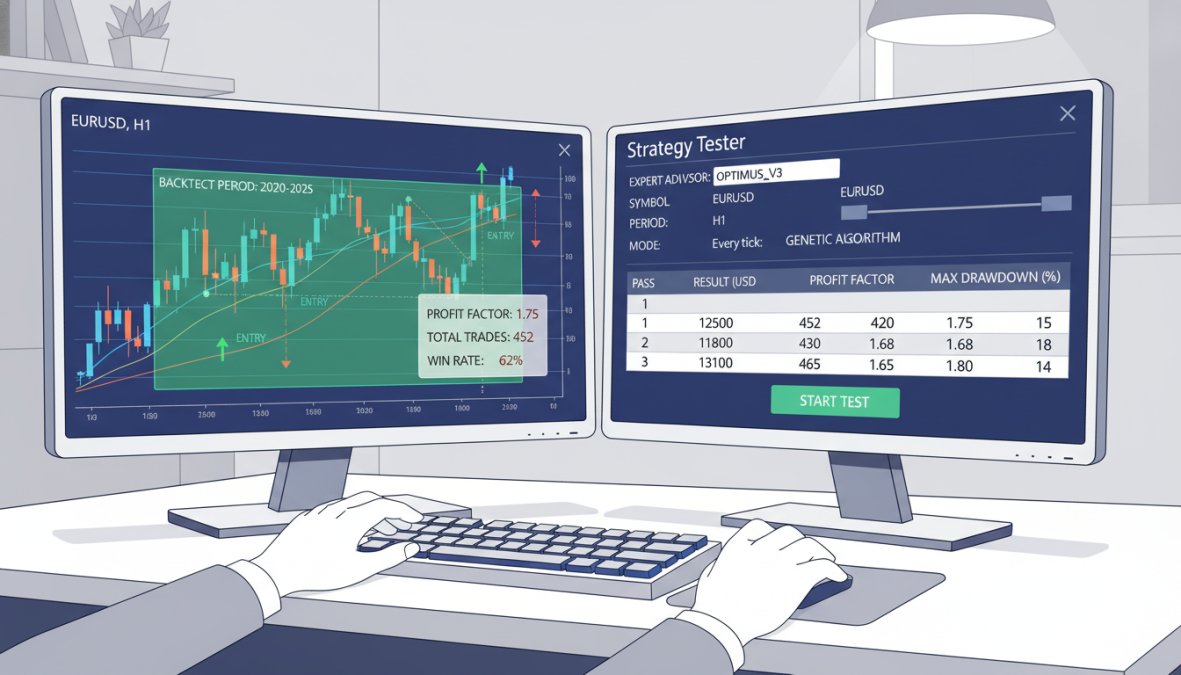
Backtesting in MT5 is the process of running a trading strategy against historical data to evaluate how it would have performed before risking real capital. The Strategy Tester is the core tool for this, and it supports both single-pass testing and multi-parameter optimization across defined ranges. But running a backtest is not the same as running a valid backtest. The difference between a result you can trade with confidence and one that will collapse in live conditions comes down to methodology, not the platform.
Close-up of a trader's hands navigating MetaTrader 5 on a dual-monitor desktop setup, with historical data charts visible on screen in a focused home trading office
Getting accurate backtest results requires quality historical data. MT5 downloads data automatically, but the default resolution is often insufficient for intraday strategies. Download tick data or at minimum M1 (one-minute) data for any strategy that uses entry timing below the H1 timeframe. In the Strategy Tester, set the modeling method to "Every Tick Based on Real Ticks" for the most accurate simulation of spread and slippage conditions. According to MetaTrader 5 official platform documentation, the platform supports multi-threaded optimization which significantly reduces testing time for complex parameter sets.
Setting Optimization Parameters Without Curve-Fitting
The Strategy Tester’s optimization mode runs your Expert Advisor across a grid of parameter combinations and ranks results by a chosen metric. The setup process:
Open the Strategy Tester (Ctrl+R)
Select your Expert Advisor from the dropdown
Choose the financial instrument and timeframe
Set the date range for historical data (minimum 2-3 years recommended, covering at least one trending and one ranging market regime)
Switch the mode to "Optimization"
Define parameter ranges for entry and exit variables
Select the optimization criterion (Balance, Profit Factor, Expected Payoff, or custom)
Run the test and review the results table sorted by your chosen metric
The parameter ranges you define determine the quality of the optimization. The most common error is setting ranges that are too wide, for example, testing every RSI period from 2 to 50 in steps of 1. This produces hundreds of results and dramatically increases the probability of selecting a parameter set that worked by chance rather than by logic. A better approach: define a narrow range around values you have a structural reason to test. If RSI(14) is the standard and you want to test sensitivity, test 10 to 18 in steps of 2. This gives you eight results instead of forty-eight, and each one has a defensible rationale.
Also separate your entry and exit parameter optimization. Changing your take profit level changes which trades close profitably, which changes the apparent quality of your entry signals. Run one optimization pass focused on entry conditions with a fixed exit, then a second pass focused on exit conditions with the best entry parameters locked in. This isolation reveals the actual contribution of each component.
Walk-Forward Validation: The Step Most Traders Skip
Optimization on a fixed historical window produces parameters that are fitted to that specific period. Walk-forward validation is the methodology that tests whether those parameters generalize to new data, and it is the single most important step between a backtest and a live deployment decision.
The walk-forward process in MT5:
Divide your historical data into segments. A common split is 70% in-sample (optimization window) and 30% out-of-sample (validation window). For a 3-year dataset, that means optimizing on the first 25 months and validating on the final 11 months.
Run optimization on the in-sample window and record the best-performing parameter set.
Run a single forward test on the out-of-sample window using only those parameters, no re-optimization.
Compare the two results. If the out-of-sample performance is within a reasonable range of the in-sample performance (most practitioners use a ratio of 0.5 or better, meaning out-of-sample profit factor is at least half the in-sample profit factor), the strategy has demonstrated some degree of robustness.
Advance the window by one period and repeat. This is the "walk-forward" element: you are testing whether the strategy would have survived being re-optimized and re-deployed at regular intervals.
MT5’s Strategy Tester does not automate walk-forward testing natively, but you can replicate it manually by running separate optimization and single-pass tests on defined date ranges. Third-party tools in the MQL5 marketplace automate this process if you are running complex multi-parameter systems.
Watch Out Optimizing purely for maximum balance in the Strategy Tester produces over-fitted results that perform poorly on out-of-sample data. Always validate your best parameters on a date range not included in the optimization window. A strategy that shows a profit factor of 2.8 in-sample but 0.9 out-of-sample has no edge, it has a data-fitting artifact.
Reading Performance Analytics: Win Rate, Drawdown, and Risk-Reward Ratio
Win rate is the most misunderstood metric in performance analytics. A strategy with a 40% win rate can be highly profitable if the average winner is significantly larger than the average loser. Conversely, a 70% win rate strategy can lose money if the losses are disproportionate. The metrics only become meaningful in combination.
Metric
What It Measures
Red Flag Threshold
Win Rate
% of trades that close profitable
Meaningless without R:R context
Max Drawdown
Largest peak-to-trough equity decline
Above 20% warrants review
Risk-Reward Ratio
Average win size vs. average loss size
Below 1:1 requires very high win rate
Profit Factor
Gross profit / Gross loss
Below 1.3 suggests marginal edge
Recovery Factor
Net profit / Max drawdown
Below 1.0 means drawdown exceeds total profit
The recovery factor is the metric most backtesting guides omit. It answers a practical question: if you experienced the worst drawdown in your test period, would your total profit cover it? A strategy with a recovery factor below 1.0 means the maximum drawdown exceeded total net profit, which means a single bad sequence could wipe out everything the strategy earned. This is a structural problem, not a parameter problem.
Drawdown is the metric most traders underweight during backtesting. A strategy that produces strong returns but requires surviving a 35% drawdown will fail in live trading because most traders will abandon it before recovery. When reviewing Strategy Tester results, sort by recovery factor and profit factor simultaneously, not by balance alone. The strategies that survive this filter are the ones worth deploying.
Also pay attention to the trade count. A strategy tested on fewer than 100 trades tells you almost nothing statistically. Aim for a minimum of 100 completed trades in your backtest before drawing conclusions about exit performance, and ideally 200 or more if the strategy trades infrequently.
Pro Tip After completing your optimization, export the results to a spreadsheet using the Strategy Tester’s export function. Sort by profit factor descending, then filter out any result with a max drawdown above your personal tolerance threshold. The intersection of high profit factor and acceptable drawdown is your candidate parameter set, not the single highest-balance result.
MT5 Trailing Stop Settings and Partial Closing for Better Exit Management
Exit management is where most MT5 traders leave money on the table. Static take profit levels cap gains prematurely, while wide stops that never trail produce unnecessary drawdown on winning trades that reverse before hitting target.
The trailing stop is MT5’s built-in solution to this problem. It moves the stop loss automatically as price moves in your favor, locking in gains without requiring manual intervention.
Step-by-Step: Configuring Trailing Stops and Take Profit Levels
Open a trade in the Terminal window (Ctrl+T)
Right-click the open position
Select "Trailing Stop"
Choose a fixed pip distance or select "Custom" for ATR-based trailing
MT5 will move the stop loss automatically as price advances
For take profit placement, ATR-based targets outperform fixed pip targets across most instruments. A common approach: set the initial take profit at 2x ATR from entry, then activate the trailing stop once price reaches 1x ATR in profit. This allows the trade to run during strong moves while protecting gains during consolidation.
Partial Close Strategies to Lock In Gains Without Exiting Fully
Partial closing is one of the most underused features in MT5. It allows you to close a portion of your position at a defined profit level while leaving the remainder to run with a reduced or breakeven stop.
A practical partial close framework:
Close 50% at 1R profit (1x your initial risk): removes pressure from the trade and guarantees a positive outcome regardless of what happens next
Move stop to breakeven on the remaining position: the worst outcome is now a scratch trade
Trail the stop on the remaining 50% using ATR or a structural level
This approach improves risk-reward ratio on individual trades and reduces the emotional weight of watching a profitable position retrace. The thing nobody tells you about partial closes is that they also improve discipline: once you’ve locked in half the trade, the decision to hold the rest becomes easier because the downside is capped.
Using Expert Advisors and MQL5 to Optimize Trade Entries and Exits in MT5
Expert Advisors (EAs) are automated trading programs that execute trades based on programmed logic within the MT5 environment. They are the most direct path to removing execution errors from both entries and exits.
The case for EAs is straightforward: human traders hesitate at entries, move stops impulsively, and exit winning trades too early due to emotional pressure. An EA follows rules without deviation. For traders who have validated a strategy through backtesting, automating execution with an EA is a logical next step.
Writing Custom Exit Logic in MQL5: What Most Traders Skip
MQL5 is the programming language native to MT5. Most traders who use EAs download pre-built systems and never write a line of code. This is a missed opportunity, because custom exit logic is where the real edge lives.
A basic custom exit function in MQL5 checks conditions on every tick and closes the trade when criteria are met. Here is the structure most traders skip:
// Example: Close trade when RSI crosses above 70 (overbought exit)
if(iRSI(Symbol(), PERIOD_CURRENT, 14, PRICE_CLOSE, 0) > 70)
{
trade.PositionClose(Symbol());
}
This is a simplified example, but it illustrates the concept: you can encode any exit condition you can define logically. Time-based exits (close before news events), volatility-based exits (close when ATR expands beyond a threshold), and multi-condition exits (close when both RSI and MACD signal reversal) are all achievable with basic MQL5 knowledge.
According to MQL5 community documentation and code reference, the `CTrade` class provides the cleanest interface for position management in MQL5, including partial close functionality via `PositionClosePartial`.
### Exit Optimization for Specific Asset Classes: Forex, Indices, and Commodities
Exit logic that works on forex majors often fails on equity indices or commodities. The reason is structural: these asset classes have different volatility profiles, session-specific behavior, and liquidity patterns.
**Forex (EUR/USD, GBP/JPY):** Session-based exits matter. Positions held through the London-New York overlap behave differently than those held into the Asian session. Many traders find that trailing stops perform better during high-liquidity sessions and fixed exits work better during low-liquidity periods.
**Indices (S&P 500, DAX):** Gap risk is significant. Overnight holds on index CFDs expose positions to gap opens that bypass stop loss levels. Intraday exit rules that close positions before market close reduce this risk materially.
**Commodities (Gold, Oil):** News-driven volatility makes fixed stops dangerous. ATR-based stops that widen automatically during high-volatility periods outperform fixed pip stops on instruments like XAU/USD. Gold, in particular, can move 3-5x its average daily range during macro events.
EZMT5 provides fully built MT5 Trading Systems that include pre-configured exit logic optimized across multiple asset classes, which removes the trial-and-error phase of building these rules from scratch.
## Keyboard Shortcuts, Terminal Settings, and Interface Tweaks That Save Execution Time
Speed matters in manual trading. A setup that takes 8 seconds to execute instead of 2 seconds can mean the difference between a good fill and a missed trade, particularly during news events or fast-moving markets.
The MT5 keyboard shortcuts every active trader should know:
- **F9**: Open the New Order window instantly
- **Ctrl+T**: Open/close the Terminal panel
- **Ctrl+R**: Open the Strategy Tester
- **Ctrl+G**: Toggle the chart grid
- **Ctrl+L**: Toggle the period separators
- **Delete**: Remove selected objects from the chart
- **+/-**: Zoom in and out on the active chart
Beyond shortcuts, the Terminal Settings (Tools > Options) contain several configurations that affect execution speed. Set the "Trade" tab to your preferred execution mode (instant or market) and confirm the slippage tolerance. For traders using pending orders, setting default lot sizes and risk percentages in the terminal saves repetitive manual input on every trade.
<div style="margin:1.5rem 0; padding:16px 20px; background-color:transparent; border-left:4px solid #e5e7eb; border-radius:0 8px 8px 0;">
<strong style="display:block; margin-bottom:4px; color:#111827; font-size:14px;"> Key Takeaway</strong>
<span style="color:#374151; font-size:15px; line-height:1.6;">The fastest execution improvement available in MT5 costs nothing: set up one-click trading via the chart toolbar. This eliminates the order confirmation dialog and reduces manual entry to a single click on the chart.</span>
</div>
Chart layout also affects decision speed. Use the multi-chart view to monitor correlated instruments simultaneously. A trader watching EUR/USD and DXY on adjacent charts spots divergences faster than one switching between tabs.
## The Psychological Barriers to Exiting Trades and How to Override Them
Execution psychology is the part of trading education that most technical guides skip entirely. Here is the uncomfortable truth: you can have a perfect exit strategy on paper and still fail to execute it because of how your brain responds to open P&L.
A focused trader sitting alone at a desk late at night, staring intently at trading screens with a notepad and pen beside them, conveying concentration and decision-making pressure
The three most common psychological barriers to exiting trades are loss aversion, premature profit-taking, and hope-based holding. Each one has a specific mechanism and a specific override.
**Loss aversion** causes traders to hold losing positions past their stop loss, hoping for a recovery. The override is mechanical: set the stop loss at order entry and do not touch it. If you find yourself moving stops on losing trades, automate the stop via EA so the decision is removed from your hands.
**Premature profit-taking** causes traders to close winning positions before they reach their target because the unrealized gain feels fragile. The override is partial closing: take some profit early to satisfy the impulse, then let the rules govern the remainder.
**Hope-based holding** is the most dangerous. A trade has clearly invalidated its setup, but the trader holds because they "believe" it will recover. The override is a written rule: define the invalidation condition before entry, and treat it as a hard exit trigger regardless of current P&L.
According to [behavioral finance research on trader decision-making](https://www.scholar.google.com), the emotional response to unrealized losses is measurably stronger than the response to equivalent gains, which explains why loss aversion is so persistent even in experienced traders. Knowing this does not make it easier to override, but it does make the case for automating exits wherever possible.
## Common Mistakes Traders Make With MT5 Entries and Exits, and What to Do Instead
After reviewing how to optimize trade entries and exits mt5 correctly, it is worth naming the specific mistakes that derail even technically sound approaches.
**Mistake 1: Backtesting on insufficient historical data.** Testing a strategy on 3 months of data produces results that reflect one market regime. Use a minimum of 2 years, ideally covering both trending and ranging conditions.
**Mistake 2: Optimizing entries without testing exits separately.** Entry and exit logic interact. Changing your take profit level changes which trades are profitable, which changes the apparent quality of your entry signals. Test them together, but also isolate each component to understand its contribution.
**Mistake 3: Using the same trailing stop distance across all instruments.** A 20-pip trailing stop on EUR/USD and a 20-pip trailing stop on GBP/JPY produce very different results because of the instruments' different volatility profiles. Use ATR multiples, not fixed pips.
**Mistake 4: Ignoring execution modes.** MT5 supports multiple execution modes including instant execution, market execution, and request execution. Using the wrong mode for your broker's infrastructure introduces slippage that your backtest did not account for.
**Mistake 5: Building exit logic without a sample size.** A strategy tested on 20 trades tells you almost nothing statistically. Aim for a minimum of 100 trades in your backtest before drawing conclusions about exit performance.
As documented in [Investopedia's guide to algorithmic trading best practices](https://www.investopedia.com), the gap between backtested performance and live performance is almost always attributable to execution differences and psychological deviation from the tested rules, not flaws in the underlying logic.
<div style="margin:1.5rem 0; padding:16px 20px; background-color:transparent; border-left:4px solid #e5e7eb; border-radius:0 8px 8px 0;">
<strong style="display:block; margin-bottom:4px; color:#111827; font-size:14px;"> Watch Out</strong>
<span style="color:#374151; font-size:15px; line-height:1.6;">Never run an untested Expert Advisor on a live account, even briefly. A single coding error in exit logic can result in a position that never closes, compounding losses indefinitely. Always test on a demo account for a minimum of 30 days before going live.</span>
</div>
---
Building a consistent edge in MT5 requires more than a good entry signal. The traders who sustain profitability are the ones who treat exit management with the same rigor they apply to entries: tested, rule-based, and mechanically executed. If you are ready to skip the trial-and-error phase, EZMT5 provides instant access to 11 fully built and optimized MT5 Trading Systems, including pre-configured entry and exit logic across multiple asset classes, real-time trade opportunities, and two license keys per system with no contracts. Get started with EZMT5 and begin trading with professional-grade systems from the moment you download.
<section style="margin:3rem 0 2rem 0;" itemscope itemtype="https://schema.org/FAQPage">
<h2 style="font-size:1.5rem; font-weight:700; margin:0 0 4px 0;">Frequently Asked Questions</h2>
<div style="padding:20px 0; border-bottom:1px solid #e5e7eb;" itemscope itemprop="mainEntity" itemtype="https://schema.org/Question">
<h3 style="font-size:1.1rem; font-weight:600; margin:0 0 8px 0;" itemprop="name">How can I improve my entry and exit points in MT5?</h3>
<div style="line-height:1.7; font-size:0.95rem;" itemscope itemprop="acceptedAnswer" itemtype="https://schema.org/Answer">
<p itemprop="text" style="margin:0;">To optimize trade entries and exits in MT5, combine technical indicators like moving averages, RSI, and ATR to confirm signals before executing. Use the Strategy Tester to backtest your entry criteria against historical data, then refine your exit logic using trailing stops and partial close features. Automating these rules through Expert Advisors removes emotional decision-making and ensures consistent execution across all trades.</p>
</div>
</div><div style="padding:20px 0; border-bottom:1px solid #e5e7eb;" itemscope itemprop="mainEntity" itemtype="https://schema.org/Question">
<h3 style="font-size:1.1rem; font-weight:600; margin:0 0 8px 0;" itemprop="name">What are the best MT5 indicators for trade entries and exits?</h3>
<div style="line-height:1.7; font-size:0.95rem;" itemscope itemprop="acceptedAnswer" itemtype="https://schema.org/Answer">
<p itemprop="text" style="margin:0;">The best MT5 indicators for entry and exit decisions typically include the Moving Average (for trend direction), RSI or Stochastic (for momentum and overbought/oversold signals), ATR (for dynamic stop loss sizing), and Bollinger Bands (for volatility-based exits). Using a combination rather than a single indicator improves signal reliability. MT5's Market Watch and customizable chart templates make it easy to set up and switch between indicator configurations quickly.</p>
</div>
</div><div style="padding:20px 0; border-bottom:1px solid #e5e7eb;" itemscope itemprop="mainEntity" itemtype="https://schema.org/Question">
<h3 style="font-size:1.1rem; font-weight:600; margin:0 0 8px 0;" itemprop="name">How do I backtest trade entries and exits in MetaTrader 5?</h3>
<div style="line-height:1.7; font-size:0.95rem;" itemscope itemprop="acceptedAnswer" itemtype="https://schema.org/Answer">
<p itemprop="text" style="margin:0;">To backtest strategies in MT5, open the Strategy Tester via View > Strategy Tester, select your Expert Advisor or script, choose your financial instrument and timeframe, then set the date range for historical data. Enable multi-threaded testing for faster results. After the run completes, review the performance analytics tab for win rate, drawdown, and risk-reward ratio. Adjust your optimization parameters and re-run until the results align with your risk management goals.</p>
</div>
</div><div style="padding:20px 0; border-bottom:1px solid #e5e7eb;" itemscope itemprop="mainEntity" itemtype="https://schema.org/Question">
<h3 style="font-size:1.1rem; font-weight:600; margin:0 0 8px 0;" itemprop="name">What is the role of risk management in optimizing trade exits?</h3>
<div style="line-height:1.7; font-size:0.95rem;" itemscope itemprop="acceptedAnswer" itemtype="https://schema.org/Answer">
<p itemprop="text" style="margin:0;">Risk management directly determines where and how you exit trades. Setting a defined stop loss and take profit before entry removes guesswork and protects your capital. Trailing stops let you lock in profits as a trade moves in your favor without closing prematurely. Partial closing strategies allow you to reduce position sizing mid-trade, balancing profitability with protection. Without a structured exit plan tied to risk management rules, even strong entries will produce inconsistent results over time.</p>
</div>
</div><div style="padding:20px 0; border-bottom:1px solid #e5e7eb;" itemscope itemprop="mainEntity" itemtype="https://schema.org/Question">
<h3 style="font-size:1.1rem; font-weight:600; margin:0 0 8px 0;" itemprop="name">Is it better to use market or limit orders for MT5 entries?</h3>
<div style="line-height:1.7; font-size:0.95rem;" itemscope itemprop="acceptedAnswer" itemtype="https://schema.org/Answer">
<p itemprop="text" style="margin:0;">Limit orders generally produce better entry prices than market orders because they execute only at your specified level or better, reducing slippage. However, market orders are faster and guarantee execution, which matters in fast-moving markets. In MT5, pending orders like Buy Limit and Sell Stop give you precise control over entry criteria without needing to watch the screen constantly. For most structured strategies, pending orders paired with defined stop loss and take profit levels tend to improve overall trade management.</p>
</div>
</div><div style="padding:20px 0; border-bottom:1px solid #e5e7eb;" itemscope itemprop="mainEntity" itemtype="https://schema.org/Question">
<h3 style="font-size:1.1rem; font-weight:600; margin:0 0 8px 0;" itemprop="name">Can Expert Advisors in MT5 fully automate my exit strategy?</h3>
<div style="line-height:1.7; font-size:0.95rem;" itemscope itemprop="acceptedAnswer" itemtype="https://schema.org/Answer">
<p itemprop="text" style="margin:0;">Yes. Expert Advisors built in MQL5 can fully automate your exit logic, including trailing stops, time-based exits, partial closes, and condition-triggered take profit adjustments. This removes psychological barriers like holding losers too long or cutting winners short. You can backtest the EA's exit behavior using the MT5 Strategy Tester before going live. Pre-built and optimized trading systems, like those offered through platforms such as EZMT5, allow traders to deploy automated exit strategies immediately without writing code from scratch.</p>
</div>
</div>
</section>