

Table of Contents
- What is MetaTrader 5 for Futures Trading
- NFA Regulated Futures Brokers for MT5
- How to Set Up MT5 for Futures
- Minimum Deposit for Futures Trading
- Key Features and Trading Costs Across MT5 Futures Brokers
- Automated Trading and Expert Advisors on MT5
- MT5 vs. Dedicated Futures Platforms
- Conclusion
Last Updated: August 12, 2026
What is MetaTrader 5 for Futures Trading
MetaTrader 5 is a multi-asset trading platform enabling access to futures markets alongside forex, stocks, and commodities. Unlike MT4, MT5 delivers enhanced processing power, faster order execution, and support for advanced automated trading strategies through Expert Advisors. For futures traders, MT5 offers real-time data feeds, sophisticated charting with multiple timeframes, and algorithmic trading capabilities across exchange-traded derivatives.
The platform supports both hedging and netting modes for position management. According to the CFTC’s guidance on futures trading platforms, regulated brokers offering MT5 for futures must maintain strict compliance with capital requirements and customer protection rules. NFA regulated futures brokers ensure your broker meets these standards.
MT5’s Strategy Tester allows you to backtest automated trading systems on historical tick data before deploying them live. You can test strategies across different market conditions, optimize entry and exit logic, and refine your approach without risking real capital. The platform also integrates depth of market data, showing the order book at each price level, critical intelligence for understanding liquidity and execution quality in futures markets.
NFA Regulated Futures Brokers for MT5
Trading futures requires a broker regulated by the National Futures Association and the CFTC. These regulatory bodies enforce strict rules around capital adequacy, customer fund segregation, and disclosure of trading risks. When you choose an NFA regulated futures broker, you’re getting a partner that’s been vetted and is subject to ongoing compliance audits.
EZMT5 stands out by providing pre-built, fully optimized MT5 trading systems designed specifically for serious futures traders. Rather than building strategies from scratch, EZMT5 gives you instant access to 11 professional systems plus all future releases, no contract lock-in, just a straightforward monthly subscription. You get two license keys per system that can be changed anytime, meaning you can run the same strategy across multiple accounts or devices without friction.
Several established NFA regulated brokers support MT5 for futures trading:
FOREX.com operates as a Futures Commission Merchant registered with the CFTC and maintains NFA membership. The broker offers MT5 through its parent company StoneX Financial, providing access to futures markets with a minimum deposit of $100. FOREX.com bundles platform add-ons from FX Blue, including nine Expert Advisors and custom indicators.
AMP Futures is a U.S. regulated Futures Clearing Merchant offering MT5 as its primary platform for new customers. The broker specializes in futures trading and charges commissions as low as $0.09 per contract. Day trading margins are exceptionally low: $50 for Micro contracts and $500 for E-Mini contracts. AMP Futures provides unlimited simulated futures trading and includes the Strategy Tester for backtesting.
OANDA is a multi-regulated broker offering MT5 support for various asset classes, including futures contracts. The broker allows zero minimum deposit on demo accounts and charges spreads only on live accounts. OANDA’s MT5 platform includes 21 timeframes and over 80 technical indicators, plus an economic calendar with real-time data.
Pepperstone offers MT5 with access to stocks, commodities, and futures. The broker provides 38 built-in indicators and 21 timeframes on the charting system. Pepperstone’s Smart Trader Tools suite includes 28 add-ons optimized for MT4 and MT5. Execution speeds reach 50 milliseconds.
The NFA’s member directory allows you to verify that any broker you’re considering is actually registered and in good standing.
How to Set Up MT5 for Futures
Start by opening an account with an NFA regulated futures broker that supports MT5. Complete the broker’s account verification process, which typically involves submitting proof of identity and address. Deposit your initial capital; minimums vary by broker but typically range from zero on demo accounts to $100 on live accounts.

Download and install the MT5 platform from your broker’s website. Launch the application and log in using the credentials your broker provided. In the terminal window, navigate to the Marketwatch tab to see available instruments. For futures trading, you’ll see contracts listed by underlying asset (e.g., ES for E-Mini S&P 500, NQ for E-Mini Nasdaq, CL for Crude Oil). Add the futures contracts you want to trade to your Marketwatch by right-clicking and selecting "Show in Marketwatch."
Configure your chart timeframes and technical indicators. MT5 supports multiple timeframes simultaneously, allowing you to analyze longer-term trends while executing on shorter timeframes. Add indicators relevant to your strategy, moving averages, RSI, MACD, and Bollinger Bands are included standard.
Set up your trading account type. MT5 supports hedging mode (allowing both long and short positions simultaneously) and netting mode (offsetting positions automatically). Most futures traders use hedging mode for flexibility.
Enable automated trading if you plan to use Expert Advisors. Go to Tools > Options > Expert Advisors and check "Allow Automated Trading." This permits Expert Advisors to execute trades without manual intervention.
Configure your order execution preferences. Navigate to Tools > Options > Trading and set your slippage tolerance, order execution mode, and other parameters. For futures trading with low latency requirements, set slippage to 2-5 pips depending on market volatility.
Minimum Deposit for Futures Trading
Minimum deposit requirements vary significantly across brokers and account types. Demo accounts typically require zero deposit, making them ideal for testing strategies. Live trading minimums range from zero to $500 or more depending on the broker and account tier.
The more critical consideration is margin requirements, not minimum deposit. Futures trading uses leverage, meaning you control a contract worth far more than your account balance. For example, an E-Mini S&P 500 contract represents $50 times the index value. If the S&P 500 trades at 5,500, one contract controls $275,000 notional value. Your broker requires margin, typically $500 to $2,000 per E-Mini contract depending on volatility and broker policy, to hold that position.
AMP Futures offers particularly low day trading margins: $50 for Micro contracts and $500 for E-Mini contracts. This low margin requirement means you can trade with a smaller account balance, though it also amplifies your risk. A $1,000 account with $500 margin per contract means you can only hold two positions before hitting your margin limit.
Calculate your required margin before opening positions. Most MT5 platforms display margin requirements in the contract specifications. Multiply the margin per contract by the number of contracts you plan to hold simultaneously to determine your total margin requirement. Add 20-30% buffer as insurance against sudden market moves that might spike margin requirements.
The CFTC’s educational resources on futures margin explain how leverage and margin work in detail.
Key Features and Trading Costs Across MT5 Futures Brokers
Different MT5 futures brokers charge different commission structures and spreads. Understanding these costs is critical because they directly impact your profitability.
Commission-Based Brokers charge a flat fee per contract, typically ranging from $0.09 to $0.85 per contract round-turn. AMP Futures charges as low as $0.09 per contract, making it attractive for active traders. These commissions are transparent and predictable.
Spread-Based Brokers like OANDA and Pepperstone don’t charge explicit commissions but instead widen the bid-ask spread. The spread is the difference between the buy price and sell price; you pay the spread every time you enter or exit a position. Pepperstone advertises spreads starting from 0.0 pips on FX CFDs, though futures CFD spreads vary by contract and market conditions.
Hybrid Models combine low commissions with a spread markup. FOREX.com uses this approach, charging commissions plus a spread.
The real cost comparison requires calculating your total trading cost per round-trip trade. If you trade 10 contracts per day with AMP Futures at $0.09 per contract, your daily commission is $1.80. Over a month of 20 trading days, that’s $36 in commissions. Compare this to a spread-based broker where the spread might cost you $0.50 per contract round-trip: 10 contracts × $0.50 × 20 days = $100 per month. For active traders, commission-based pricing often wins.
Real-Time Data and Market Depth vary across brokers. All MT5 brokers provide real-time quotes, but some offer depth of market (DOM) data showing the full order book. This is critical for understanding liquidity and predicting short-term price moves. AMP Futures and Interactive Brokers provide strong DOM data.
Execution Speed and Latency directly affect your ability to execute strategies at intended prices. Pepperstone advertises 50-millisecond execution speeds. If you’re running high-frequency strategies or scalping, latency matters; if you’re swing trading, it’s less critical.
| Broker | Commission | Minimum Deposit | Day Trading Margin (E-Mini) | Best For |
|---|---|---|---|---|
| AMP Futures | $0.09 per contract | $100 | $500 | Active futures traders |
| FOREX.com | Commission + spread | $100 | Varies | Regulated U.S. traders |
| OANDA | Spread only | $0 | Varies | Spread-conscious traders |
| Pepperstone | Spread or commission | $0 | Varies | Low-latency execution |
Automated Trading and Expert Advisors on MT5
Automated trading means deploying algorithms to execute trades based on predefined logic without manual intervention. Expert Advisors (EAs) are programs written in MQL5 that implement your trading strategy. You define entry conditions (e.g., "buy when the 20-period moving average crosses above the 50-period MA"), exit rules (e.g., "sell when price reaches profit target or stop loss"), and risk parameters (e.g., "risk 2% per trade"). The EA monitors the market continuously and executes trades when conditions are met.
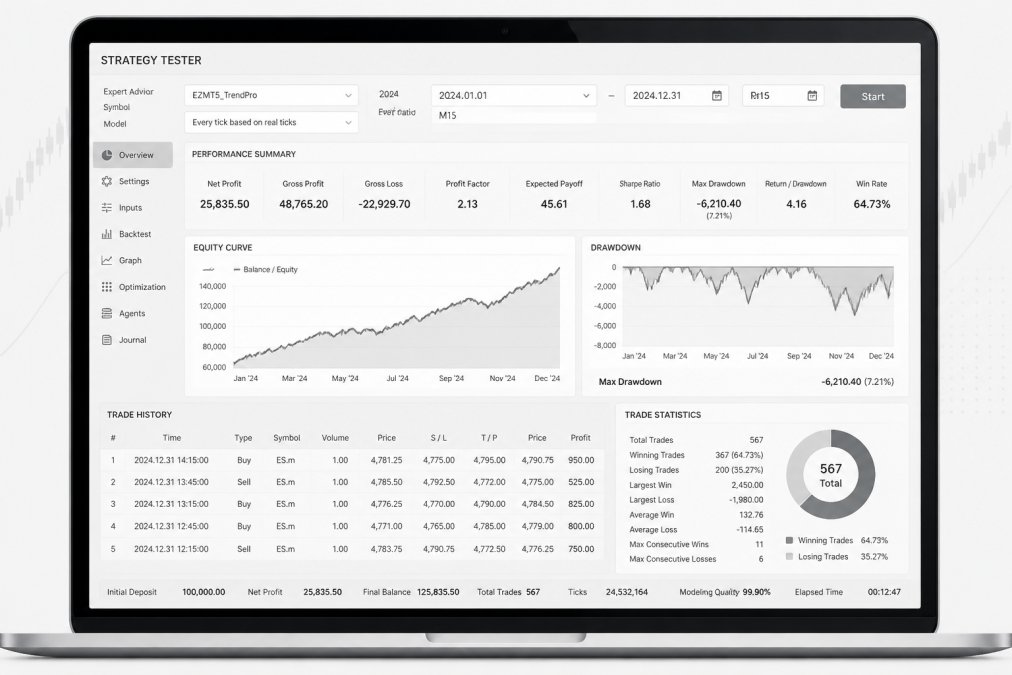
The Strategy Tester is your sandbox for validating EAs before deploying real capital. You load historical price data, configure your EA parameters, and run backtests across different time periods and market conditions. The tester generates a detailed report showing total trades, win rate, profit factor, maximum drawdown, and other metrics.
Critical caveat: Backtesting results don’t guarantee live performance. Historical backtests suffer from survivorship bias, look-ahead bias, and curve-fitting. A strategy that shows 40% annual returns in backtesting might produce losses in live trading due to slippage, commissions, and market regime changes.
EZMT5 addresses this challenge by providing 11 professionally built and optimized systems. The systems come pre-configured with entry logic, exit rules, risk management, and position sizing. You import them into MT5, attach them to your charts, and they execute trades automatically.
Expert Advisors require careful configuration. Set your risk parameters conservatively; most professionals risk 1-2% of account equity per trade. If your account is $10,000 and you risk 2%, you’re risking $200 per trade. Calculate your position size accordingly: if your stop loss is 50 pips below your entry and you risk $200, you can trade 4 contracts.
Enable the EA on your chart by right-clicking the EA in the Navigator panel and selecting "Attach to a Chart." Verify that automated trading is enabled in your account settings. Monitor the EA’s performance in the first days of live trading, watching for unexpected behavior, slippage, or execution issues. If something looks wrong, detach the EA immediately and investigate.
MT5 vs. Dedicated Futures Platforms
MT5 is a multi-asset platform that handles forex, stocks, commodities, and futures. Dedicated futures platforms like NinjaTrader specialize exclusively in futures trading.
MT5 Advantages: Broad asset access means you can trade multiple markets from one platform. The learning curve is moderate. EZMT5’s 11 systems are built specifically for MT5, so you get plug-and-play automation without platform-specific coding. The cost is typically lower; many MT5 brokers charge minimal or zero fees for platform access.
MT5 Limitations: The platform wasn’t built specifically for futures, so some futures-specific features are missing. Depth of market data is limited compared to NinjaTrader. Tick charts are unavailable on MT5. If you’re a serious order flow trader who needs footprint charts and DOM analysis, MT5 feels limited.
NinjaTrader Advantages: Purpose-built for futures trading with advanced order flow analysis, footprint charts, and tick-level backtesting. The platform integrates directly with futures brokers, offering low-latency execution. Day trading margins are competitive.
NinjaTrader Limitations: Doesn’t natively support MT5, so strategies require translation. The learning curve is steep. Platform licensing adds cost on top of commissions.
Practical Reality: If you’re trading multiple asset classes, MT5 is the better choice. If you’re trading only futures and want the most advanced order flow tools, NinjaTrader wins. For traders using EZMT5, the decision is straightforward: the 11 systems are optimized for MT5, so you get immediate value without rebuilding strategies or learning a new platform.
The MT5 futures broker landscape offers genuine choices. EZMT5 stands out because it eliminates the most painful part of the journey: building and validating trading systems. Rather than spending months backtesting and refining your own logic, you get instant access to 11 professional systems, all future releases included, with flexible two-key licensing and no contract lock-in. Start trading immediately after download and automate your trades with precision execution. For serious traders ready to move beyond theory and deploy proven systems, EZMT5 delivers the tools and flexibility you need. Signup Now
Frequently Asked Questions
Can I trade futures with MT5?
Yes. MetaTrader 5 supports futures trading through brokers that offer futures access. MT5 provides real-time data, technical analysis tools, and automated trading via Expert Advisors. However, not all MT5 brokers offer futures, you must choose a broker with direct futures access or futures CFDs. Regulated brokers like FOREX.com, OANDA, AMP Futures, and Pepperstone all support MT5 futures trading, allowing you to trade exchange-traded derivatives across multiple asset classes.
What is the minimum deposit for futures trading?
Minimum deposits vary by broker. FOREX.com requires $100, while OANDA allows $0 on spread-only accounts. AMP Futures does not specify a minimum but charges commissions as low as $0.09 per contract. Day trading margins are significantly lower than initial deposits, AMP Futures offers $50 margins for Micro contracts and $500 for E-Minis. Check your broker's specific requirements, as margin rules are set by the clearing house and the broker.
Which US brokers are NFA regulated for futures?
FOREX.com is a registered Futures Commission Merchant (FCM) and NFA member. AMP Futures is regulated by the CFTC and NFA. OANDA is U.S. regulated and offers MT5 for futures. Interactive Brokers is a major FCM with self-clearing status. These brokers meet stringent regulatory requirements, including capital reserves and customer fund segregation, protecting your account against broker failure. Always verify NFA membership on the NFA website before opening an account.
What makes MT5 better than MT4 for futures trading?
MT5 offers faster execution, more timeframes (21 vs. 9 on MT4), over 80 built-in indicators, and enhanced charting tools. The Strategy Tester supports more granular backtesting for futures strategies. MT5 also handles multi-asset trading more efficiently, allowing you to trade futures, forex, and commodities on one platform. However, MT4 still has a larger library of third-party Expert Advisors available through MQL4. For serious futures traders, MT5's technical depth and execution speed are significant advantages.
How do I automate futures trading on MT5?
Use Expert Advisors (EAs) built in MQL5 or download pre-built systems from the MQL5 marketplace. To automate, attach an EA to a futures chart, configure your trading parameters, and enable automated trading in MT5 settings. Backtesting is essential, use the Strategy Tester to refine your strategy on historical data before deploying it live. Many brokers like FOREX.com and AMP Futures offer free EA VPS hosting to keep your trading active 24/5, though some require minimum monthly volume or charge a fee.
This article was written using GrandRanker