

Table of Contents
- What Automated Trading Strategies for MT5 Actually Deliver
- How to Set Up and Deploy Automated Trading Strategies in MT5
- MT5 Strategy Tester Tutorial: Backtesting Before Live Execution
- Algorithmic Trading Risk Management: Stop-Loss, Drawdown, and Position Sizing
- MQL5 Programming for Beginners: Building Custom Scripts Without Expert Knowledge
- Python Integration with MetaTrader 5: Advanced Automation and Data Analysis
- Common Execution Errors and Debugging Automated Strategies
- Conclusion: Starting Your Automated Trading Journey
Last Updated: August 5, 2026
What Automated Trading Strategies for MT5 Actually Deliver
Automated trading strategies for MT5 remove emotional decision-making and execute trades with mechanical precision based on predefined rules. A human trader might hesitate on a signal or fail to manage multiple positions simultaneously; an automated system doesn’t hesitate, doesn’t sleep, and processes market data in milliseconds.
Most traders assume backtesting results predict live performance, they don’t. A strategy showing 40% annual returns historically can collapse in live markets due to slippage, execution delays, and changing conditions. The real value of automation is consistent execution, mechanical risk management, and scaling across multiple pairs without burnout.
At EZMT5, we provide 11 fully optimized trading systems designed for MT5 with real-time trade opportunities and professional-grade execution. Systems come pre-built and ready to deploy, no coding required, no weeks of setup. Download, configure your account, and systems begin executing according to their algorithmic logic.
The core advantage is speed to market. Instead of spending months backtesting and tuning parameters, you’re trading within hours. For traders juggling careers and families, automation handles execution while you manage which systems fit your risk tolerance.
The biggest mistake traders make with automated systems is deploying them live without understanding how they performed in forward testing (recent historical data not used in optimization). Always run a strategy through at least 6 months of forward-test data before committing real capital.
How to Set Up and Deploy Automated Trading Strategies in MT5
Setting up automated trading strategies for MT5 requires only a few steps. First, open a funded trading account with a broker that supports MT5 and allows automated trading. Not all brokers permit algorithmic trading; verify this before opening an account.

Download MT5 from your broker’s website and install it on a VPS (Virtual Private Server) for 24/7 uptime. If your computer crashes or loses internet, your systems stop executing. A VPS ensures continuous operation at minimal cost ($10-30 monthly) compared to the risk of missed trades.
After installation, navigate to the Market section in MT5 to find trading systems. Pre-built systems vary wildly in quality. EZMT5’s 11 systems come fully optimized, tested across multiple market conditions, and ready for immediate deployment.
To deploy a system, download it from the Market and attach it to a chart of your chosen instrument. Open the system’s settings and configure position sizing, risk parameters, and custom variables. Before going live, test on a demo account for 2-4 weeks in a simulated environment to watch execution and verify risk management aligns with your expectations.
The setup process takes 30-60 minutes if you’re starting fresh. The real time investment is understanding how each system works and whether it fits your trading goals.
MT5 Strategy Tester Tutorial: Backtesting Before Live Execution
The MT5 strategy tester is your laboratory for running historical simulations. Open View > Strategy Tester, select your system, and set parameters: symbol, timeframe, and date range. Most traders backtest over 2-5 years to capture different market regimes.
Click "Start" and the tester simulates every trade the system would have executed. Within seconds, you get results: total profit, drawdown, win rate, and Sharpe ratio. The Sharpe ratio matters most, it measures risk-adjusted returns. A ratio above 1.0 is solid; above 2.0 is excellent.
Critical caveat: backtesting results don’t guarantee live performance. Historical data doesn’t account for slippage, commissions, or changing market conditions. A system optimized perfectly on past data often fails when market structure shifts.
Use forward testing to validate results. After backtesting on 2020-2025 data, test forward on 2025-2026 data not used in optimization. If performance holds, you have more confidence. If it deteriorates, the system may be curve-fitted rather than genuinely profitable.
Avoid over-optimization. Tweaking parameters endlessly to maximize historical returns creates systems that work perfectly on past data but fail immediately live. Simpler rules with consistent logic outperform over-fitted complexity.
Algorithmic Trading Risk Management: Stop-Loss, Drawdown, and Position Sizing
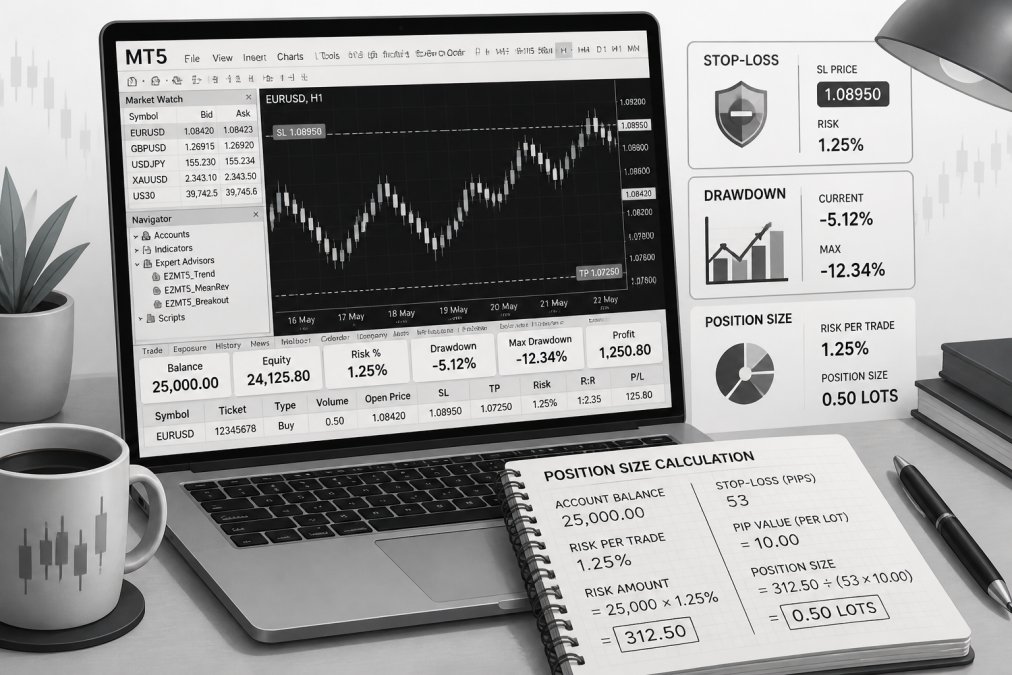
Algorithmic trading risk management is the difference between sustainable operations and blown-up accounts. Three mechanisms protect capital: stop-loss orders, drawdown limits, and position sizing.
A stop-loss order exits a trade automatically if it moves against you by a set amount, capping losses on single trades. Most professionals use stops between 30-100 pips for short-term systems and wider stops for longer-term strategies.
Drawdown is the peak-to-trough decline in account equity. If your account grows from $10,000 to $15,000 then drops to $12,000, your drawdown is $3,000 or 20% from peak. Most traders set maximum acceptable drawdown at 20-30%. If drawdown exceeds this threshold during live trading, pause the system and reassess.
Position sizing determines capital risked per trade. Risk-based sizing is superior to fixed sizes: if you risk 1% of your account per trade, a $10,000 account risks $100 per trade. As your account grows, position size grows proportionally, preventing overleverage.
Calculate position size using: (Account Size × Risk Percentage) / Stop-Loss Distance = Position Size. If your account is $10,000, you risk 1% ($100), and your stop-loss is 50 pips, your position size is 2 micro-lots. This mechanical approach removes emotion and ensures consistent risk.
Many traders also implement equity stops: if the account drops below a certain threshold (e.g., 10% drawdown), the system pauses automatically.
MQL5 Programming for Beginners: Building Custom Scripts Without Expert Knowledge
MQL5 is the programming language native to MT5, designed specifically for building trading systems. You don’t need to be a software engineer, the language is straightforward with thousands of community examples available.
Start with the MetaQuotes Language Reference documentation. Learn basic concepts: variables, functions, loops, and conditions.
A simple automated trading system follows this structure: define entry condition, define exit condition, calculate position size, and execute the trade. The actual code is compact, a basic system might be 50-100 lines.
For traders uncomfortable with coding, pre-built systems like EZMT5 eliminate this barrier entirely. You get fully functional automated trading strategies for MT5 without touching code. Systems are already compiled, tested, and ready to attach to charts.
If you want to learn MQL5, start by modifying existing code rather than writing from scratch. Download a simple system, change one parameter, recompile, and backtest. This teaches mechanics without overwhelming complexity.
Python Integration with MetaTrader 5: Advanced Automation and Data Analysis
Python integration with MetaTrader 5 enables advanced possibilities for traders combining MT5 with external data sources, machine learning models, or complex analysis. Python is more flexible than MQL5 with vast libraries for statistical analysis and algorithmic development.
Install the MetaTrader5 Python library via pip: pip install MetaTrader5. This allows you to read price data, place orders, and monitor positions directly from Python scripts.
A typical workflow: pull historical price data from MT5 into Python, analyze it with pandas and NumPy, generate trading signals, and send orders back to MT5. You might use Python to fetch OHLC data, calculate advanced indicators, run machine learning models, optimize parameters across thousands of combinations, or generate detailed reports.
Python scripts run on your local machine or remote server and communicate with MT5 via API calls, introducing slight delays compared to native MQL5 code. For swing trading or longer timeframes, latency is negligible. For high-frequency scalping, delays matter.
Deploy Python scripts on cloud hosting (AWS, Google Cloud) for 24/7 execution regardless of your local machine’s status.
Common Execution Errors and Debugging Automated Strategies
Automated systems fail in predictable ways.
Requote Errors: Order rejected because price changed between sending and broker receipt. Solution: use market orders or increase slippage tolerance.
Insufficient Margin: Not enough equity for your position size. Solution: implement equity-based position sizing so size shrinks as account shrinks.
Order Send Failed: Broker server overloaded. Solution: implement retry logic, wait 1-2 seconds and try again.
Execution Speed Lag: Signal generated but price moves before order reaches broker. Solution: use a VPS geographically close to broker’s server or accept wider stop-losses.
Chart Data Gaps: Incomplete historical data causes incorrect calculations. Solution: ensure your chart has loaded all historical data before starting the system.
Indicator Repaint: Some indicators recalculate on the current candle, causing false signals. Solution: only trade on closed candles using Close[1] instead of Close[0].
Enable logging in your system to write status messages to a file for review. Check the MT5 Experts tab for error messages and codes.
A common mistake is deploying live immediately after backtesting shows good results. Always run a system on a demo account for 2-4 weeks first. This reveals execution errors and real-world performance gaps that backtesting doesn’t show.
Conclusion: Starting Your Automated Trading Journey
Automated trading strategies for MT5 are powerful tools for consistent execution and systematic risk management. The barrier to entry is lower than ever: pre-built systems are available, backtesting tools are built into the platform, and cloud hosting ensures 24/7 uptime.
Choose a system aligned with your trading style and risk tolerance. Backtest thoroughly. Forward-test on recent data. Deploy on a demo account for 2-4 weeks. Only then move to live trading with real capital.
EZMT5 simplifies this process. Our 11 fully built and optimized trading systems come ready to deploy in MT5 with no coding required. You get immediate access to professional-grade systems, real-time trade opportunities, and precision execution. Two license keys per system and no-contract monthly subscription mean you can adjust your strategy mix as market conditions change. Start trading like a pro immediately after download.
Ready to automate your trading? MetaTrader 5 official documentation provides the platform foundation. MQL5 community reference guide offers coding resources. Investopedia’s guide to algorithmic trading covers broader strategy concepts. For proven systems deployed immediately, EZMT5 eliminates the development phase entirely. Access 11 professional automated trading strategies for MT5 with all future systems included. Get started today.
| Strategy Type | Best For | Setup Time | Risk Level |
|---|---|---|---|
| Trend-following | Directional markets | 15 minutes | Medium |
| Mean reversion | Range-bound markets | 15 minutes | Medium-High |
| Breakout | Volatile markets | 20 minutes | High |
| Grid trading | Sideways markets | 25 minutes | High |
| Scalping | High-frequency execution | 30 minutes | Very High |
| Multi-timeframe | Diverse conditions | 30 minutes | Low-Medium |
Frequently Asked Questions
Can I automate trading in MetaTrader 5 without programming experience?
Yes. Pre-built automated trading strategies for MT5 require no coding, you download, attach to your chart, and the system executes buy and sell operations automatically. If you want custom logic, MQL5 scripting has beginner-friendly syntax, and many traders start with simple templates. EZMT5 delivers fully built systems ready to deploy immediately after download, eliminating the need for programming knowledge to get started.
How do I know automated trading strategies actually work in live markets?
Backtesting using MT5's Strategy Tester shows historical performance, but live forward testing reveals real execution speed, slippage, and actual market conditions. The best strategies are optimized on historical data, then tested forward on recent price action before deploying real capital. Monitor your trade account's actual results, drawdown, Sharpe ratio, and win rate, against backtested projections. If live results diverge significantly, the strategy may need parameter tuning or market conditions may have shifted.
What's the real cost of a monthly subscription versus buying systems outright?
Monthly subscriptions accumulate cost over time, but offer flexibility to cancel anytime and access new systems as they're released. Outright purchases lock in a one-time fee but provide no updates or new strategies. EZMT5's no-contract model includes all future systems in the subscription, so you get new algorithmic logic and optimizations continuously without additional fees. Calculate your annual cost and compare against individual system purchases plus the cost of missing future improvements.
Can I use two license keys per system on different accounts or devices?
Yes. EZMT5 provides two changeable license keys per system, allowing you to run the same strategy on separate trade accounts or devices simultaneously. You can switch license keys anytime without reactivation delays, giving you flexibility to move strategies between accounts as your trading needs change. This setup prevents lock-in and lets you scale across multiple brokers or account types.
How often are new automated trading strategies released, and will they be quality?
New systems are included in your subscription automatically. Quality depends on the builder's track record, look for systems that show documented backtesting results, forward testing periods, and realistic Sharpe ratios (typically 1.0 or higher for professional strategies). Each new strategy should be backtested rigorously and tested forward on recent market data before deployment. Ask about the builder's experience and request performance metrics for any new system before using real capital.
This article was written using GrandRanker